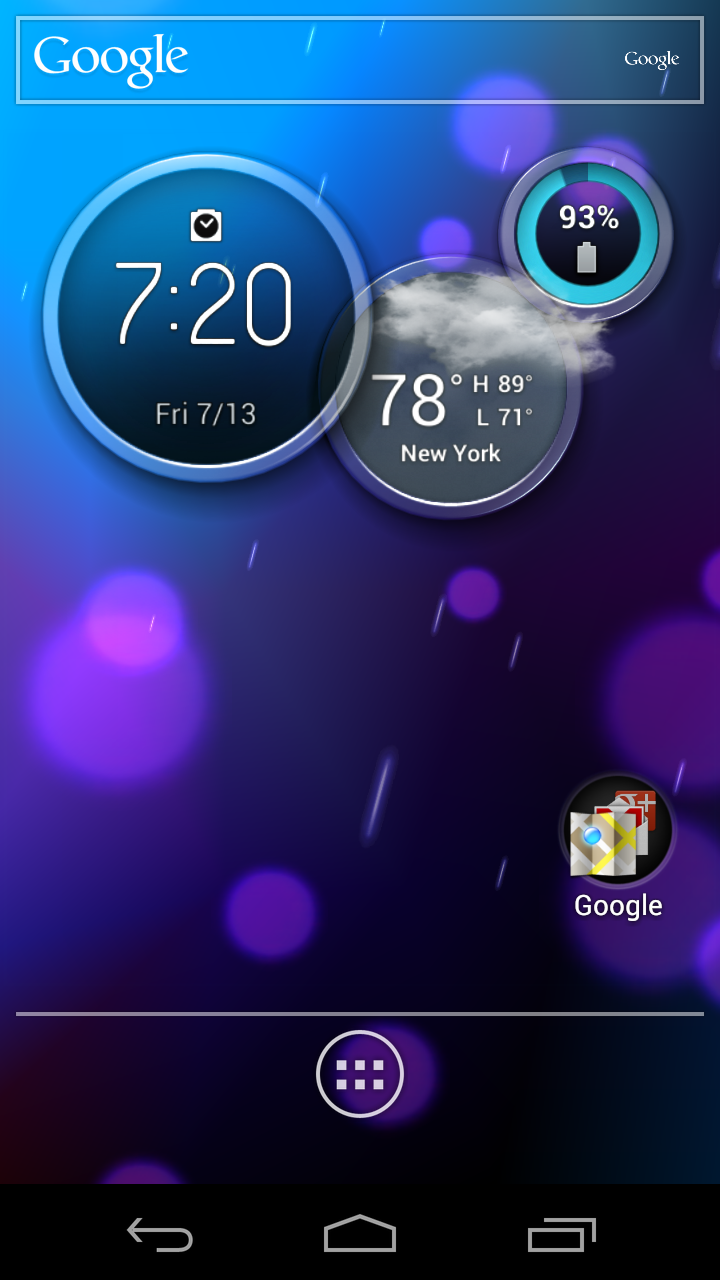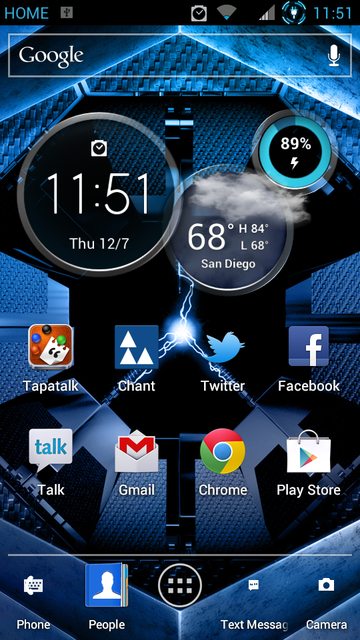
The clock widget from the Atrix HD that we featured yesterday, has apparently been pulled from a device and is available for you to download. The clock itself is interactive, showing you time, weather in multiple cities, and your battery and data plan percentages. It’s easily one of the better clock widgets we have seen in some time. If it sounds like something you would love to have on your device, then jump at the download link below.
*We should point out that in order to use this clock widget, you have to install the home launcher from the Atrix HD. You also have to use the home launcher from the device to or the clock will error out.
Download: AtrixHDWidgets.zip
Instructions:
1. Unzip the .apk files from the .zip.
2. Install all three apps.
3. Launch the Atrix HD launcher and add the circle clock as a widget.
Via: DroidRzr
Cheers Guanhao and Matt!
Good Link — >> Working on 9/29/12 http://www.mediafire.com/?6p7qyuefzcfdx5q
The link doesn’t work anyway… Good read tho…
Updated AtrixHDWidgets.zip download ink is here: http://www.mediafire.com/?6p7qyuefzcfdx5q
Installed on an SII, but it’s constantly popping up with “Homescreen has failed to respond” then “wait” or “close”. Anyone else seeing this?
File anyone?
If you don’t want to install the launcher you could always use UCCW (Ultimate Custom Clock Widget). Not sure if you can get the exact same functionality but you can make it look and act any way you want. The program has a bit of a learning curve but it just about the only clock/weather/battery you will ever need. With the somewhat recent addition of hotspots the program has near limitless potential. I used it to make an LCARS home screen and it was simple and beautiful.
Hey guys, I just ported this clock skin to UCCW, here.
http://forum.xda-developers.com/showpost.php?p=28739684&postcount=6112
Hey guys now i have 2 fav widgets where are they located so i can delete the atrix one thanks
File has been pulled…
Everytime I try to put the circle widget on my homescreen I keep getting “Unfortunately, the process com. mortorola.homescreen has stopped”. Is anyone else getting this?
Theres no way to get this to work using nova or some other third party launcher?
Any way to make change the default screen back to the middle? Having it on the far left gets annoying pretty quickly.
So I used this for a while – I unrooted my RAZR MAXX for the ICS OTA update, and I haven’t gotten a chance to reroot it, therefore my weather still isn’t working until I get root and am able to uninstall the previous Motorola weather app. Anyway, I noticed that if you get a text message notification (while the phone was locked), and then you unlock the phone, the circle where the time is changes to a preview of the text you just received. I thought that was pretty cool. Obviously, clicking it does take you to the text conversation.
I decided to go for the Atrix HD launcher because I was using the stock launcher since the ICS update and I preferred the fact that there is a stationary Google Search bar on top in the Atrix launcher, as well as the ability to have 7 home screens instead of the maximum 5 on the RAZR MAXX’s launcher.
Too bad Droid Razrr still only shows battery times in 10% increments…100%, 90%, etc. Any one know how to change that?
meh ill give it a try for a day even if i have to use that damn launcher
Thanks dl you guys always have rhe sweet hook ups
Does anyone know how to uninstall the atrix hd launcher. I installed it and now cant get rid of it. Any assistance would be great.
root explorer
Anyone test if the AtrixHD launcher has separate set of home screens for Webtop, like the Bionic and Razr?
Yes, I tested it with my Lapdock and it does have separate screens. It functions pretty much exactly like the Bionic homescreen app in Webtop, except you can add up to 7 screens instead of just 5.
Awesome.
are there any widget apps that have this type of widget? It looks nice
I used the Rings Digital Weather Clock widget for a while to get that look. Pretty nice, and Free.
https://play.google.com/store/apps/details?id=factory.widgets.bubbledigitalweatherclock&feature=search_result#?t=W251bGwsMSwxLDEsImZhY3Rvcnkud2lkZ2V0cy5idWJibGVkaWdpdGFsd2VhdGhlcmNsb2NrIl0.
You guys really need to make a wallpaper section. I love the blue razr wallpaper, but I can’t find it anywhere.
The Blur Razr Wallpaper is from Mattlgroffs Arctic Rom over at droidrzr.com – I will dropbox it for you though 🙂 – http://goo.gl/FSTbA
Thanks! Looks great on my DROID 4.
Ran the launcher for all of 10 seconds then un installed. Thanks for posting regardless.
doh..should have read the last part..oh well at least its downloaded!! lol
Hey I wonder if there’s any Widgets in the mark…uh…play store that look like this widget so I don’t have to use the Atrix launcher. :rolls eyes:
Three down votes? Some people don’t get sarcasm I guess. LOL.
Keep getting “There is a problem parsing the package” oh well guess my R2D2 is too old/incompatible.
I used Astro to install. After you click on the zipped AtrixHDwidgets it opens up and show all four. Now press on what you want to install. Three options pop up. press on open app manager. Now install all four. (Don’t have to install Favorites)
Stopped downloading after I read *note lol
The weather app won’t install on my RAZR MAXX with ICS. Says a system app with the same signature is already installed. The rest works though.
Download the Systemapp remover from the play store. Then remove the weatherwidget.apk in the system app menu. Then install the weather apk from the AtrixHDwidgets…..then enjoy!!!!
You can backup and uninstall the old weather.apk using Titanium Backup. Then install the new weather.apk. Tried freezing it first, but that didn’t work. Runs great now on my Bionic.
just did this(a little late, sorry) but i just changed the name of the system app from weatherwidget.apk to weatherwidget.apk.bak and then installed this one and it worked
Folks, we know that One More Clock is similar. We wrote about it weeks ago. This clock is different because it is interactive. However, yes, it does suck that you have to use the Atrix HD launcher with it.
One More Clock allows you to set different parts of the widget to launch different apps. In my mind it is “interactive” as well.
Will you post that wallpaper please?
It’s one of the default Atrix wallpapers. Just Google for it (you can also search by image on Google images, you could have searched with the screen shot).
Can’t find it nor a system dump to pull it from.
I used to have it, forgot where I found it. There is a similar wallpaper from any of the MotoBlur phones.
Find a dump from the newest Droid X build, the OG Atrix, etc. It’s out there!
error 404 when you click on link
Click Bait!
…and i bit ….
CRAPDANGIT
all that work just to install a widget …. it looks cool and sounds cool but not worth the effort
I have been using it for about a month. The one in market has a bunch of other skins
this is pretty cool
This is also available as a skin on the “One More Clock” widget. No need for the Atrix launcher:
https://play.google.com/store/apps/details?id=com.sunnykwong.omc&hl=en
…but again, it does not have the same functions which is what I think people are looking for…
Looks the same… I have it. It isn’t the same. It doesn’t flip to show different stats for example.
and it costs a dollar
It does? Since when? I have it in my free version.
I dont know i just clicked the above link and it says $0.99
There’s a free version
I’ve been using this one, and I think it looks better. Doesn’t have multiple-city weather (useless to me) or data plan monitoring (also fairly useless to me). Also doesn’t require me to install four .apk files or use a crappy launcher.
The launcher is fairly stock. But yeah you could keep your launcher.
There are four .apks in the .zip folder, so I think you meant to tell us to install all four?
You can skip the favorites.apk file unless you want to use Moto’s favorites widget. The weather.apk is required to use the weather features of the circle clock. The other two are the circle widget and the Atrix HD launcher, both required.
Or you could just install the One More Clock Widget from the market. Looks just like it.
https://play.google.com/store/apps/details?id=com.sunnykwong.freeomc&feature=nav_result#?t=W251bGwsMSwxLDMsImNvbS5zdW5ueWt3b25nLmZyZWVvbWMiXQ..
But does not function like it…
And is also quite the battery hog
Isn’t this the same widget from One More Clock?
Just a copy. This is the acutal widget. One MOre Clock doesn’t have the feature to flip and see different stats
It’s available here:
http://play.google.com/store/apps/details?id=com.sunnykwong.freeomc
and no need to install another launcher
Or this http://goo.gl/dmgHp
With the Chrome Rings theme… not a feature rich, but looks pretty similar
There’s a similar clock in the market called Rings Digital Weather Clock. Seems to work perfectly on my RAZR with ICS….
Meh. I don’t see anything special about this widget, IMO. Oh well..having choices is always a good thing though.
ugh was all excited till you said you had to use the Atrix home launcher in order for it to work.
Same here, no thanks
“One more clock widget” from play store is free and has the exact same skin…nothing else to install plus a few more features.
…gads, minus a few features as well… none of the “flip” stuff work with OMC widget
It also massively drains your battery.
UCCW already has this one, and its pretty close to the original.
^ Yup, me too, Urgg
yep.. bailed the second I read that.. SEE YA
The question is, Does it work on Jelly Bean?