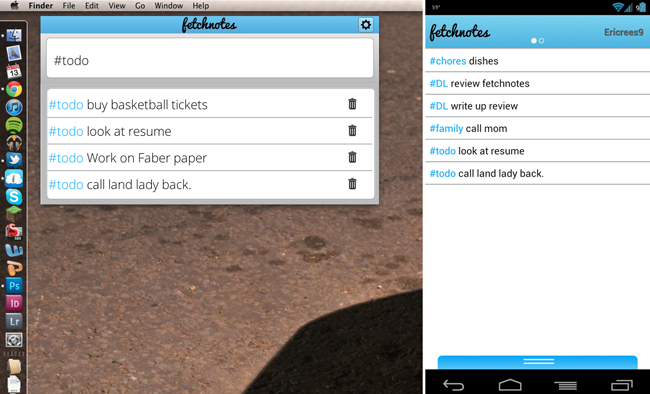
I stumbled upon Fetchnotes this morning while looking through the Google Play store, which is actually pretty handy for finding new applications. Simply put, Fetchnotes is a simple note taking application insipired by Twitter that looks to keep everything short and sweet. After signing up for the service you’re ready to go, just swipe to the right to access the note screen and give your note a hashtag to categorize it. When you’re done with your note just swipe back to the left and bam, it’s saved. You can search notes by their hashtags when you start to build up a longer list.
Where Fetchnotes looks to shine though is being everywhere at the same time. They have desktop applications for Windows, Mac and even Ubuntu. The application on the desktop is simple like the mobile application. Just add in your note and hashtag and hit save. Once you log-in it will sync the note with your phone. They even have a browser based version of it as well. Fetchnotes wants to be wherever you are and is doing a pretty good job of it. The application just launched today so there is still some work to be done; one notable nit-pick is that syncing takes a few minutes. The application runs quite smoothly though and definitely seems to be Android 4.0 inspired. Fetchnotes definitely has some potential, hit the Play link below for a download.
Play Link
![This Icon Pack (Could Be) Hot: Marshmallow Icons [Beta]](https://www.droid-life.com/wp-content/uploads/2015/08/marshmallow-icons-768x512.jpg)
When it comes to Notes/Notepad, I think the best two are “Evernote & Catch” both does everything this one does and a whole lot more…
I’m a fan of Catch notes. It uses hash tags AND categories, let’s you sign in with Google, and uses ICS design principles for phone and tablet.
Waiting for someone to cry about seeing a mac desktop…
That was my first reaction, eww a mac! Lol
notes for ICS is much better and it syncs with your Gmail tasks on the desktop.
“Much better” is pretty hugely subjective, particularly as “Notes for ICS” doesn’t support tags, syncing notes to my Google Tasks account is pretty unintuitive, and editing notes in the Google Tasks interface sucks donkey scrotum.
I think an obvious question that wasn’t addresses is why should we switch to this from Evernote.
Hi Hank, Alex Schiff, co-founder and CEO here. We’re not expecting people to switch from Evernote as we see ourselves as complementary rather than competitive. Evernote wants to be your virtual brain that holds all your meeting minutes, agendas, class notes, etc. — document-style notes and photos and the like that might be a page or more. We aim to provide a simple solution for all those unstructured blips and thoughts like “oh crap I need to remember to repsond to Hank’s comment” or “wouldn’t it be cool if there was an Airbnb for chefs?” Because Evernote is set up to handle all those longer notes, it’s pretty clunky for the short stuff, especially when you need to organize it somehow. That said, we know people like everything in one place, so we plan to integrate with their API in the near future.
Feel free to email me any time with your feedback at alex(at)fetchnotes(dot)com.
I’m really liking Springpad lately.