A Google Maps update to version 4.3 should be available to everyone in the Android Market and includes some nice new features you’ll enjoy.
The first is an update to search results when looking for say, a place to eat. You can now check out current ratings, thoughts and overall feel for a place to help you with your decision.
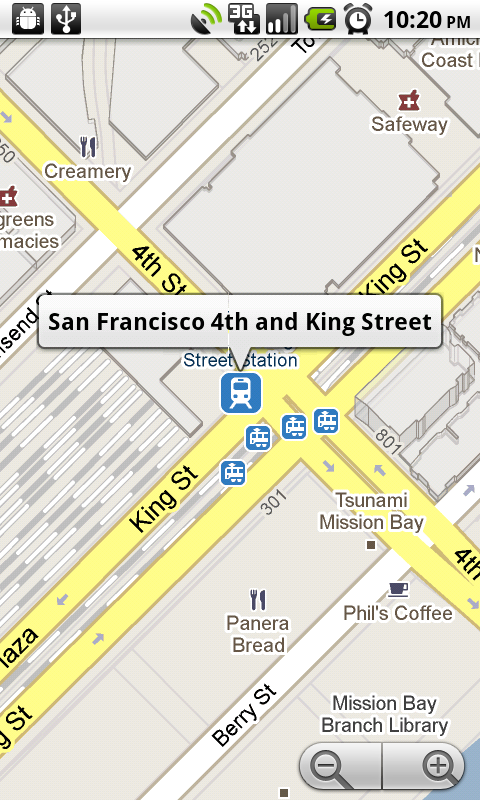
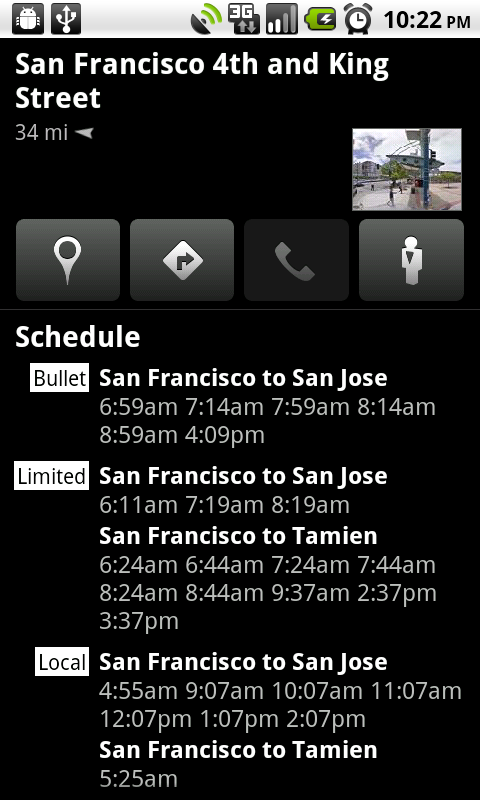
The second update and probably most important, is the addition of transit schedules and locations. It’s funny that this update came out this week as some of my friends and I were just complaining about the lack of this feature over the weekend. Yay Google!
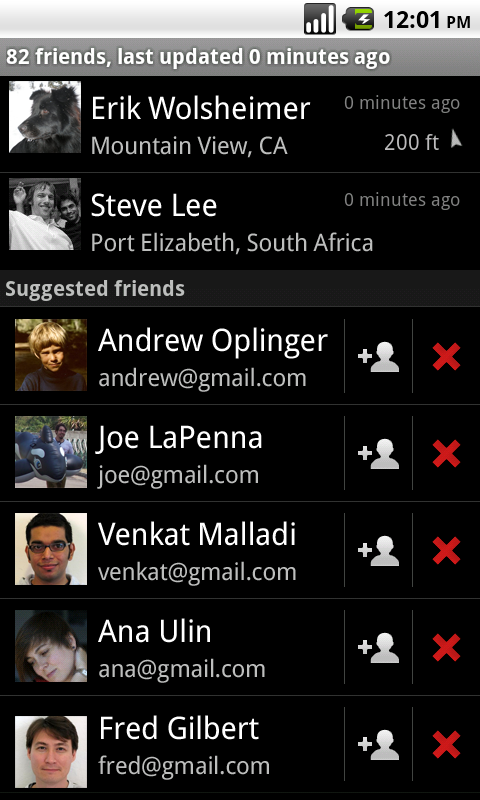
And the last of the new features is a major Google Latitude overhaul. You can now find friends and family plus share your location with them so much easier.
Anyone tested the new goodies yet?
*Note* – To those running a Droid Froyo ROM, you may run into issues with the update. Stay tuned for a permanent fix.
Source: Google Mobile Blog

I have noticed a major bug in this update – the telephone tab is ALWAYS disabled (see your third image above), even when you are looking at teh details for a business or store!!! You cannot call the place (but you CAN see street view, YAY :-P). That makes no sense – this was one of the most useful features of google maps, what is the deal with this???
I CANT DOWNLOAD GOOGLE MAPS. i am rooted with froyo and i cant download google maps. any suggestions???
I am in Indonesia and an update not available.. how to get this update?
LOL! 4th and King is where I work. How funny Kellex. I'm an Amtrak Engineer.
I find it interesting all the names, emails, and photos and left in the screenshot.
I downloaded Terminal Emulator but it keeps force closing on me. Any ideas? Running JRummy 2.2
Thanks for the write up!
i tried the emulater its not finding the map.apk and i tried reeboting my phone nothing is working im on jrummy froyo kang…any one with any kind of info please email me at basit917@gmail.com
ok i just tried using titanium to uninstall it now i dont have the map on there and i cant download it or get it out of my back up please help i need my google map
Thanks to Jrummy for this. Do this in terminal emulator:
su
mountsys
rm system/app/Maps.apk
cd system/bin
sh pm uninstall com.google.android.apps.maps
unmountsys
Then download the undated maps from the market and your good to go.
This worked like a charm for me! Had the new Google Maps installed in less than 2 minutes. 🙂
Thanks!
This worked for me. Thanks.
worked!
thanks
well
Didn't work for me. Using JRummy 2.2. I was able to uninstall my current maps, but now am unable to get the update. Any ideas?
Did anyone else catch that maps 4.3 has cloud-to-device permissions in the security section? I wonder what awesome feature that's going to be used for 😀
It is so so you can send directions to your phone from you computer I believe
But the Chrome to Phone app handles that. This is something different i think. Although I'm not sure…
Can Titanium back up be used to uninstall Maps? Has anyone tried it yet?
http://rapidshare.com/files/401766024/pkg.apk.html
This is the APK I pulled off my phone – Somebody try it? LEGIT!
Thanks! It is legit, but still won't install, ugh.
Shoot.. The ONLY way I could fix the problem was by installing the SDK (it's very easy to do.. Much easier than it looks)
http://www.mydroidworld.com/forums/motorola-dro…
Follow this link and try it.
Well, I followed those instructions, and when I got to the point of entering adb.exe uninstall com.google.android.apps.maps, it give me an error of /system/bin/sh: pm: not found. Any ideas?
adb kill-server
adb root
adb remount
adb shell rm /system/app/Maps.apk (then, back out of adb shell)
adb uninstall com.google.android.apps.maps
Try it in this order..
I'm not sure what you mean by back out of adb shell, or how to do it, but typing those lines in that order produced the same error when entering the last line.
type “exit” (without the quotes) until you back out to the command prompt (without the #)
I already had Maps.apk deleted, and I'm still getting this error. Anyway, I ended up using root explorer to delete data/data/com.google.android.apps.maps, but I still can't get Maps 4.3 to install. I'll just have to deal with Maps [BRUT] for now. Thanks anyway.
I tried it with root explorer as well.. It wouldn't work. The ONLY way I could do it was the way I mentioned to you. It took a couple tries, but it finally worked.
Google and their tricks to disable us Froyo ROM people from getting it! tricky tricky!
Yeah all these updates are great and all but how about most importantly they fix the accuracy. Im tired of being told i'm 3 blocks from my actual location. and that i have to be in a moving vehicle because it can focus in on me..
“Accurate to 5000 feet” Yeah, thanks!
Are you using latest version? I am in wooded area in washington, using the Motorola Droid – It finds me in the middle of my living room.. Accurate within a few feet.. Before the last two updates, it was blocks off..
Same here in Fort Lauderdale.
Do you guys make sure you've turned on your GPS radio? If not that could be why you see yourself in the wrong place. It's showing the nearest cell tower triangulation instead. I can sit in my work parking lot with those last few updates and it will show me either in my parking space or the one right next to me 🙂
Totally agree. Something is wrong.. It's EXTREMELY accurate. I have a Garmin Oregon 300 GPS.. The touchscreen GPS that is built to JUST be a GPS and I leave it at home now, relying on my Droid to navigate me through the woods for GeoCaching.. I was just in some pretty dense cover, it was raining.. I actually made a few comments about how accurate my GPS was in such thick cover.. It was amazing!
You need to figure out why your GPS receiver is unable to get a fix. It's not the app if you're stuck with that level of accuracy. Google Maps will fall back to less accurate methods of determining your location if GPS is not available. Try some of the forum sites. There are plenty of threads on troubleshooting GPS issues.
I'm running a Droid Froyo-based ROM. I had to erase /system/app/Maps.apk, remove the related <shared-user> tag from /data/system/packages.xml, reboot, and then install Maps from the market. Works fine, now.
I just tried that and no dice. Still had problems installing and I checked and suddenly I have google maps again AFTER HAVING ERASED IT before the reboot. I'm lost now.
I had to use ADB to fix it.. the above method didn't work for me..
adb kill-server
adb root
adb remount
adb shell rm /system/app/Maps.apk (then, back out of adb shell)
adb uninstall com.google.android.apps.maps
Nice – worked perfectly for me. Thanks briderx!
Credit goes to “My Droid World” – Glad it helped!
What exactly does back out of adb shell mean?
It means, since you went into ADB Shell in step 4 – by typing “adb shell rm /system/app/Maps.apk” – that puts you into the “shell”. When in shell, you should either see a “#” or a “$” symbol. You don't want either showing for the last step.. You need to back out of there, and get back to your dos prompt. by typing “exit” without the quotations, you will get back out to the dos prompt, removing the # or $ symbol. Then, you can type “adb uninstall com.google.android.apps.maps” (again, without quotations)
So, here's some updated instructions: (Assuming you're already in your /android/tools directory AND that you have USB DEBUGGING enabled VIA settings) TYPE EXACTLY THIS!
adb kill-server
adb root
adb remount
adb shell rm /system/app/Maps.apk
exit
adb uninstall com.google.android.apps.maps
Here is a screenshot of my command prompt. http://img101.imageshack.us/img101/2874/adbc.jpg
Thanks in advance for your help
Okay.. On your phone, try to go to Menu>SuperUser Permissions then, close it. Open it again, close it.. try running that last command again. See if there is anything on the top of your screen asking for permissions..
if that doesn't work, try typing “adb shell” – Press enter – then type “su” (always without quotes) then, back out typing “exit” and you may need to type exit again.. But you should be back to the command prompt. Try running the last command.. adb uninstall com.google.android.apps.maps
And if THAT doesn't work, reboot the phone and try again.
I got the # and $ symbols to show up by first using the command adb shell and then getting su access. My phone prompted me to grant access, which I did. Then I proceeded with the rm /system/app/Maps.apk command. I then backed out of the shell and tried the final command which ultimately failed and gave me the same error as in the screenshot I posted. I am rebooting right now and trying again. Thanks again for the help.
Ooh.. So close I can taste it! Sorry I'm not more help. I am at work, and pulling all this out of my head. If I were home, i'd follow along and give you better directions.
You have been great help. I wouldn't have even gotten this far without you. Maybe its an issue with the ROM I'm using, Team Chaos Froyo. Which ROM are you on?
No, it's something i'm not telling you, i just can't pinpoint it.. I am programming my router table (at work) as we speak, so my mind is kind of warped.. Let me think about it for a few..
I am running BB
I got it working using the new terminal commands Kellex posted. Whats weird is that I tried a similar way of uninstalling maps through the adb shell but it kept giving me a failure result. Thanks so much for your help though. I wonder what the problem was.
adb.exe root
adb.exe remount
adb.exe shell rm /system/app/Maps.apk
adb.exe uninstall com.google.android.apps.maps
try typing it just like this!
Ill try when I get home in a few hours.
Thanks for the reply but I don't see any # or $ symbol. I'm doing this through command line on my computer, is that the proper method to be doing this or am I supposed to do this from another application or from the phone?
You're doing it right.
After typing adb shell rm /system/app/Maps.apk and pressing enter you don't see a # or $ after that? if not, then go ahead and go to the next step: adb uninstall com.google.android.apps.maps
When I do that last step it says that it couldn't find the file. Let me restore my phone and try again so I tell you exactly what it says.
Thanks. I'll try that.
worked great… thanks
Confirmed works!
Awesome! Some are having problems still. If there was anything you modified from my instructions, PLEASE post here what you did differently. Some are having problems, some are getting it..
You seem pretty good at adb. I have used it in the past fine, but ever since I keep getting this error when ever I run and adb command
* daemon not running. starting it now *
cannot bind 'tcp:5037'
ADB server didn't ACK
* failed to start daemon *
error: cannot connect to daemon
Do you have any suggestion or know what is wrong, because I use to enjoy using adb, but now I can't 🙁
are you running the latest version of the sdk? A newer version was released.. Make sure you're in debugging mode (seems like you are)
It seems like there is another program trying to use that port..
Yea I deleted the old sdk that I had and downloaded the new one, but it is still the same problem. How would I fix this port problem?
I think I found the problem. I have a stuck adb in my computer memory. It won't be removed by my activity monitor aka task manager, so I am trying a reboot and will tell you how it goes.
That is probably the problem! Congrats! Let me know how it works!
Ok so far it looks good the adb is gone in the background so it is no longer stuck. I will try in the morning to se if it works! 🙂
It worked Yes Yes Yes Yes!
I got lost trying to mess with the XML file…i dont wanna mess anything up so I'll just wait for a fix.
Sweet! That worked for me as well, running BB 0.2.1 w/ NexTheme.
cant figure out which <shared user> tag is for google maps. theres one right about it and them one after all its items, which do i delete?
This is wonderful 🙂
+1 to google!
Wanna know what else is wonderful? The 2 additional wallpaper packs I sent Kellex. Looking forward to seeing those drop 😀
Say what!?!? When and where?!? I need to see these!
Droid-Life Fractal wallpaper pack – http://www.mediafire.com/file/jaundmgznmd/DL_wa…
Droid-Life Monochrome wallpaper pack – http://www.mediafire.com/file/ydkm2mgnumj/droid…
I need theme suggestions. Got any?
Downloading now…
Let me check these out…
Whoops here is the Droid-Life Monochrome wallpaper pack – http://www.mediafire.com/file/hkjym32yogz/DL_Mo…
Holy crap! These are REALLY good man!!!
Love em! I love geometry and these hit the spot!!!
Sweet! I had no idea you were so good! I should have known!
As for ideas, I think you are already doing just fine! lol
Any whales though? lol
Think a bokeh themed wallpaper pack would go over well? How about a skyline/cityscape pack of 50 major cities?
Or potatoes? lol
Oh my god these are freakin awesome man! keep up the great work!
Have any particular themes you would like to see?
Like the idea of a skyline one especially of miami. Other then that maybe a sports one (college football), but im sure everyone will love whatever you come up with.
Fantastic work!
I'm on Jrummy stock froyo and won't let me download. It says the installation was unsuccessful. Any ideas?
try one of these fixes… http://www.mydroidworld.com/forums/motorola-dro…
the xml one worked for me, tried the other 2 and they wouldn't work.
Oh sweet, thanks man. Did you try the root explorer or ADB. I've never used ADB before.
is anyone having a problem installing the update gonna really use any of these new so called features that often? probably NO.. LOL..
Yes.
I did the Google Maps fix I found on mydroid the other day. I loaded this update from the market on my froyo system with no problems
Ya cant get this to download .. 2.2 froyo Jimmy
AND WE SCORE AGAIN~!!!!!!! 1:2 south korea~!!!!
sorry…i couldn't contain myself 😉
Just a little off topic, but my maps location is always off by about a 1/2 mile to a mile. Even with my GPS and wifi. Is there something I'm missing? My buddy has got a Droid also and his is spot on. He's running 2.1 and I'm on 2.2. Assistance please!!!!
Did they ever get the problems with the GPS not locating you correctly that everyone was experiencing on the 4.2 update?
Never had problems with 4.2. I have had problems with the GPS receiver but that had nothing to do with Google Maps.
Can someone post the .apk?
Posted, it didn't work. If you cannot update through the market, you are going to have to do one of the fixes in the comments.
Transit info has been there for a while…at least in PDX. Based on your screenshots the look and feel has improved (i.e. one less click to get to the actual schedule), but the info hasn't changed
off topic… but on updates…. am i the only feeling a little sad with the lag on the launcherPro lately?
No slowdown here.. I am even using that beta from yesterday (forget the name) something “Quick”..
I uninstalled as the lag was getting pretty bad on my unrooted Droid. The updates seemed to be getting buggier.
same here. at first hated to see it go, but was surprised to find that I'm really fine with the stock.
Lag on LauncherPro? No such thing lol
What system are you running and what are you clocked at?
Launcher is soooo smooth
im still stock… im too scared to root… so it must just be my phone!
Oh, yep…
Ever launcher is laggy on stock lol no offense.
Also, don't be scared 🙂
There are some AMAZING tutorials on this site that will guide you through rooting.
It is worth it. Anyone will tell you. Plus, the chances of you hurting your phone are very slim 😛
Let me know if you ever wanna go for it 🙂
i want to, but dont wanna do it myself…. if someone lived near me and did it for me i'd be all for that! But how am i gonna call someone when i screw up and cant use my phone? lol. See, thats why im scared! I know everyone on this website is oh so helpful, im just a scardy-cat 😉
There's plenty of info and assistance available via forum sites.
If you do it, and can't call anyone for help, you just come on here. I know a few of us that will walk you through it.. Just do it. You have NOTHING to lose. And MUCH to gain! It's so easy, a Caveman could do it.
Well if you are in the Bay Area I would be glad to help. 😛
If you take the plunge, let us know 🙂
Hahaha, i wonder if you would get any responses if you posted a help ad on craigslist…
Worked great for me! Froyo 2.2 – Had to do the ADB Fix for Google Maps – Kellex – You should try pulling the APK off there and throw it up on megaupload for those that can't download it through the market..
That would be great I can't download it or update it with 2.2 froyo rooted
http://rapidshare.com/files/401766024/pkg.apk.html
Try that!
thanks is this google maps complete app?
A couple others tried it, and it didn't work.. Looks like if your 2.2 has broken google maps, then that file is useless :(.
You need to install the SDK on your computer and erase google maps off your phone. It's VERY SIMPLE! Much simpler than rooting your phone..
http://www.mydroidworld.com/forums/motorola-dro…
Follow this, but once the SDK is installed, use these commands:
adb kill-server
adb root
adb remount
adb shell rm /system/app/Maps.apk (then, back out of adb shell)
adb uninstall com.google.android.apps.maps
Can I just go into Titanium back up and click on Maps 4.2.0 and select “uninstall?” then reinstall pkg.apk
You can try.. I don't use titanium backup.. See if it works. Post your success/failure!
put it on my SD root and opened it with file manager and hit update and it did not install. Same same. What else can i do?
how do u find friends
Can't help you there man ….
seemed to get rid of the indicator for what direction you're facing
I believe that was an option you had to select from Google Labs. Haven't updated yet, but that would be my guess.
That option not there anymore, that's what I'm saying. 🙂
But magically, the cursor just reappeared. Yay!
It did get rid of that….what the…that was one of my favorite options.
it's still there, but its out of “labs” and put into maps as a feature
7th! Damn, you're busy today kellex
Awesome…instant get away times!
Woah first again. 2 today.
This time you seriously got lucky…lol
I was so on it
Haha battle baby,
Oh Vader tater, the force is no longer with you.
I must be too old for the training…fml lol