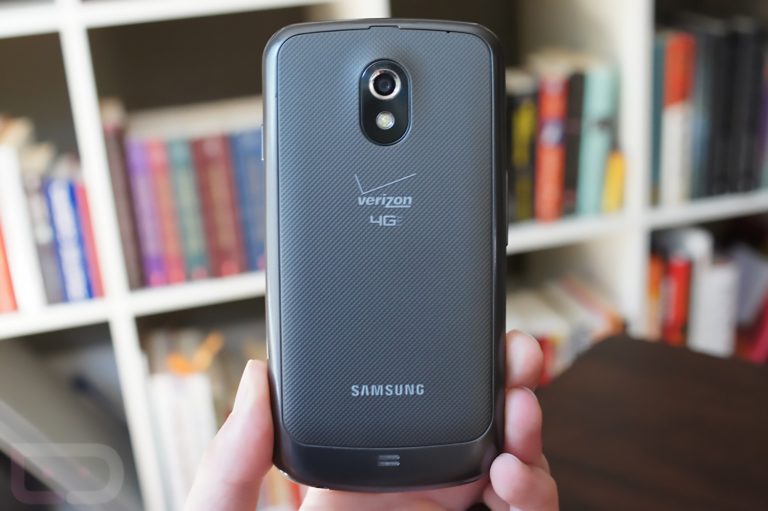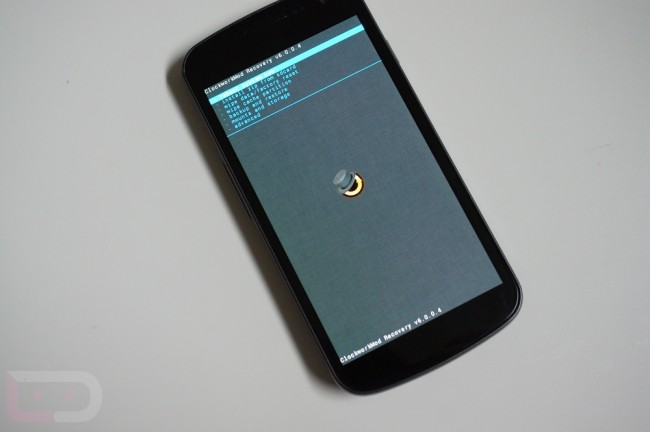
Last week, Koush talked about a release of ClockworkMod Recovery 6 that would include a handful of new features. Last night, we released the update for the Galaxy Nexus, bringing with it faster backups, a new backup format, fixed restoring of backups greater than 2GB, and a fancy new background. If you want to update to this right away, you can do so through ROM Manager.
Speaking of ROM Manager, he also announced that everyone’s favorite ROM flasher is in need of a makeover. A UI rewrite will arrive “shortly” and will include a paid ROM section, an option to upload your ROM for anyone to use, and the ability to connect your ROM to Recovery Builder. It’s hard to believe that this fantastic app has been around for 2 years already. Bring on the makeover!
Via: Google+
Cheers Scott and Scott!
Why can’t I find the upgrade in clockwork mod. Can someone tell me where to look for it ? I have never upgraded before I’ve always kept the original now I am ready
Glad to see the overhall… Can Titanium backup be next? Please?
My friends considering a Galaxy Nexus or a Galaxy S3.. which should he get? He’s also very impressed by Jelly Bean?
i just switched to GooManager and TWRP, and am really happy for now (TWRP is a really great recovery), but I’m always willing to switch to the next great thing 🙂
ROM Manager has pretty much been useless since I got my Gnex. It doesn’t have a lot of the most popular ROMs like Liquidsmooth and half of them don’t update very quickly (or at all). And they want me to pay for the Touch Recovery? I already paid for the app! I hope they add more ROMs soon because so far it’s been wasted money.
Just downloaded 6.0.0.4 VZW: (Touch Version)
Ran a backup, first thing, and….
No file in the backup folder is over 389K.
I also now have a “blobs” folder in the clockworkmod directory that has over 4400 items in it totaling over 600MB.
Haven’t tried a restore yet, because this just doesn’t seem….right.
Anyone have the inside scoop on this?
Check out this xda post. Its because of the new backup format.
http://forum.xda-developers.com/showpost.php?p=28884097&postcount=1
Excellent. That explains it perfectly and makes a hell of a lot more sense than the wasteful way it was done in the past.
Thank you very much for posting this. The quotes from that post should be added to this article (or at least linked). It’s a *huge* change over how things used to be done.
Sweet!!
For everyone commenting on how this isn’t touch based:
http://www.clockworkmod.com/rommanager
There is a touch based version available right there.
Works like a charm! Thanks!
I know this isn’t touch based, or anything like TWRP but I gotta say this update was much needed and it now works extremely well, MUCH better than the previous version. I can now use the volume keys to scroll up and down without it going all berserk on me. I know I should still switch back to TW but I am content with this for now. Good job Koush, better late than never.
Anyone know if the previous backup format is still compatible in this new version?
It’s better to delete previous backup and create a new one. 6 doesn’t have backward compatibility, as it has a different format. It can still restore from older backup I guess, but that backup will not benefit from the de-duplicate feature of 6.
FYI…My first backup using 6.0.0.1 backed up fast but there was no files in the backup folder. Just be sure to check before wiping anything.
I believe “HE” released it, not “WE” … Besides this bad disquss SW don’t you guys have spell and grammer check? Or have you joined Gawker ?
Since you’re calling people out… it’s “grammar”, not “grammer”.
Is this new version touch based? I have the touch based version installed and want to make sure if I upgrade then the new version is touch based as well.
for everyone but you
The one you can install straight from Rom Manager is not touch. It gives you the option to pay/donate to get it though.
However, if you go to his website you can download the touch version for free and use adb to push it to your phone.
Ahh, no more overshooting and double-backing and “back button disabled” nonsense
I can live without touch controls since these issues are fixed. Seriously, it was like using a slot machine trying to selected the option I wanted sometimes.
There is a touch version i flashed directly from the app
Yeah, I’ve seen that, but I’ve also seen some Roms that don’t seem to work well with CMW touch, so I’ll stick with non-touch version for now.
When touch was first released I had issues with flashing certain roms as well but after giving it another try shortly after I’ve had 0 issues.
Im just pissed they dont issue a players card. How am I suppose to get comped without one?
I think we need some villas, and some free drinks.
To quote R. Kelly: “Hope y’all got ya playas cards!”
+100
Thank goodness they finally fixed this. I can now read the menu and don’t have to deal with severe overshooting with all that hassle.
Thank you very much!
that doesn’t look touch enabled… why isn’t it?
Tested and its is YEA!
Any support for the Razr?
Paid ROM section? Didn’t I already pay for ROM Manager Premium? I love Koush’s work, but I hope that people with Premium get free access to whatever DLC he is planning.
They do
Installed it last night when popping on Bugless. Worked really well.
Bugless Beast FTW!!! Seriously, I’m running BB 07/14 and it’s the best ROM I have ever used, EVER!
It really, really, is!
Why so good? I’m still on JellyBelly. Can you give a few of yourfav features?
my personal favorite features are: *many* fewer bugs than most ROMs out there (i would never call anything bugless, but it’s about as close as you can get) , smooth, good battery life, stock experience, no bloat/cruft
Maybe they’ll actually make ROM Manager work worth a damn.
No kidding, I only use that thing to reboot into my TWRP recovery. Once Pete adds a “reboot to recovery” power menu option to BB, I’ll uninstall the ROM Manager.
I use Simple Reboot by Francisco Franco to boot into recovery (I’m also on the Jelly Bean version of BB). No need to open ROM Manager. It’s nothing too special, but it does save a few steps.
you might want to try GooManager, which is kinda like a more basic ROM Manager, but it works very nicely with TWRP (and it’s totally free)
Big longtime fan of CWM but I’ve moved on to TWRP. Will give CWM6 a shot thought. Those guys are great.
Same here, TWRP is so much easier to use and I love the install queue.
I’ve always had better luck queuing up zips in ROM Manager (have to enable “advanced” mode). Doing it in TWRP, if you hit the wrong file halfway through…you gotta redo the entire queue. Hate that…
…maybe my fingers are just too big.
LOVE the new design, plus I don’t have the overshoot issue like I did with 5.5.0.4. Amazing as always.
Bad google+ link?
“Error 404 (Not Found)!!1”
Haha.
Now we have to think of something for 4.1.1
No link…where’s the 411?
https://plus.google.com/103583939320326217147/posts/SdyVzvxKkUh they forgot to take their profile numbers out of the link.