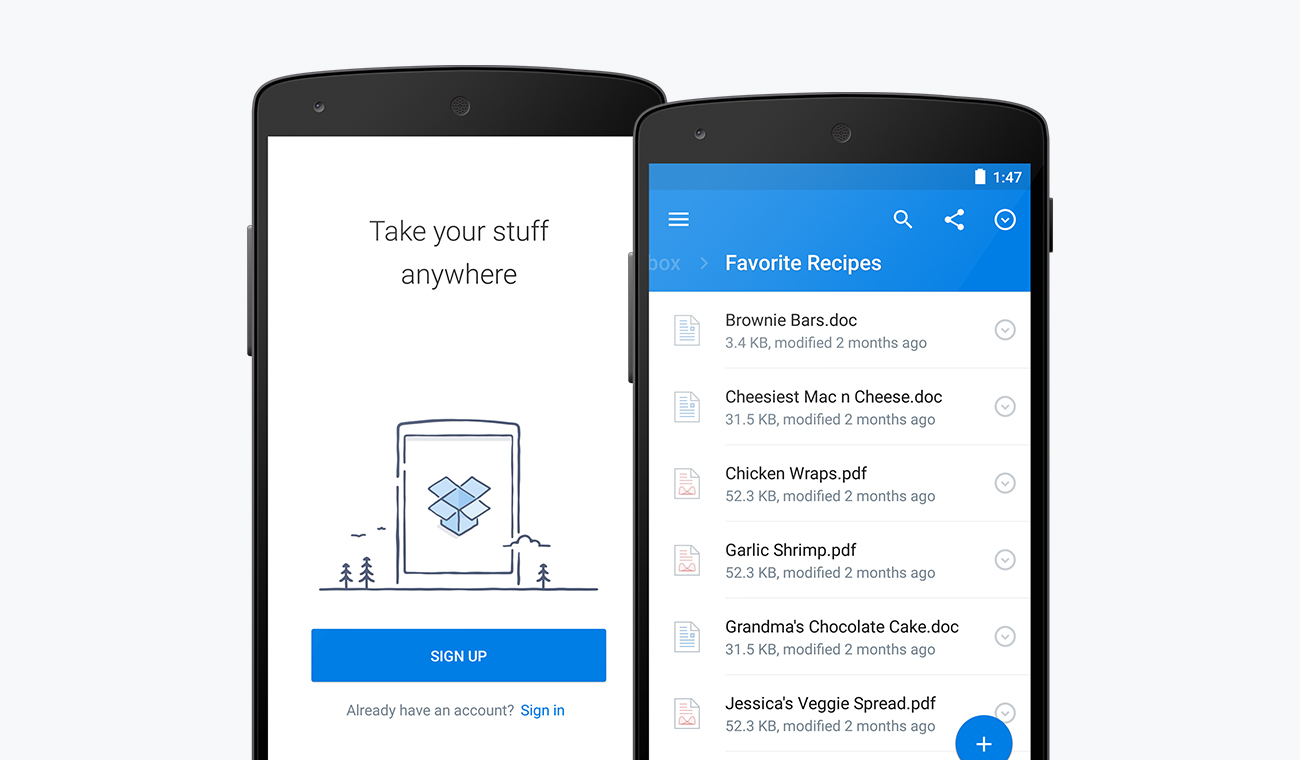

Dropbox on Android received a big update today that ushers in a new design for the storage app, along with a handful of new features.
In the redesign, Dropbox is giving you a taste of Material Design, with FAB, new slideout drawer, and cleaner UI. As Dropbox states, the “fresh look” is “right at home on the latest versions of Android.”
As for new features, Dropbox has added in the ability to take a photo from within a folder, should you want to save a photo directly to that folder. This could be really handy for not only snapping photos of events or gatherings, but also for those who snap photos of bills or other documents. They also improved search and made sharing controls more consistent across the app.
Here are the new goodies outside of the redesign, according to Dropbox:
- Put photos where you need them. We’ve added a “plus” button that lets you take a photo right from the folder you want to save it to. Want to share whiteboard notes from a meeting with everyone? Just go to a shared folder, snap a photo, and upload it directly. Best of all, photos you take using the “plus” button will go straight to Dropbox, bypassing your gallery and saving space on your device.
- Find stuff faster. Our new search icon — located in the top menu — helps you find just what you’re looking for (and you can search within documents too). We’ve also made browsing easier. Now you can swipe left and right to easily navigate through folders on the go.
- Take action on files. We’ve put key sharing controls — and common file actions like favoriting, moving, and renaming — in the same place across the app. Whether you’re in your file list or previewing a document or photo, just go to the info pane to take action. You’ll also see richer info like file and folder locations, modification dates, and shared folder members in the file list.
The update is rolling out slowly over the coming days on Google Play.
[responsive_vid]