More Reading

Post navigation

78 Comments

  • people will always bitch about the iOS but who cares. If someone creates an app with any features of some sort so what if it looks like Apple. People are just too funny and complain that Apple is the plague. But you know, if you don’t like it then don’t download it. I like it and its pretty cool. There are some thing Apple has thats good that Android fans would like, and vice-versa. So let it be and the person who did this app, awesome job.

    • Easier to swipe from bottom than from the top. Plus it’s good to reduced clutter in notification bar.

  • Well, I don’t see anything wrong with it. If anything, this again shows how powerful Android is; compared to iOS. I saw another theme on the play store called AndiOs7. Along with control center look it also has notification center, lockscreen slider & clock, weather app, icons etc. i.e. – the complete iOS7 look for android. As the developer says in the description, “Compare screenshots below with actual iOS7 screenshots shown in Apple website and then tell me if this is not the best reproduction of that.”. Gotta agree with them.

  • So basically it will continue to look like Android with one of it’s many custom skins out there?

  • Especially since Android’s interpretation is actually PRETTY F’ING TERRIBLE–and needlessly so, mind you–since half of the controls don’t actually toggle, but just take you into the settings where you have to do your switching. Which you could have MORE EASILY DONE by just tapping on the “Settings” icon on your screen (1 step) instead of pulling down notifications + pressing controls button (2 steps). If this app covers this obvious defect in Android’s version of control center, then I’m definitely game!

    This is just like the inability to hang up a beeped-in call without ending the entire thing: Just senselessly missed opportunities in everybody’s favorite OS…

  • imo, if you want ios, buy an ios device, don’t buy an android device and make it look like ios

    • What about someone wanting the flexibility of Android but making it look like iOS? I don’t get this “get an iOS device if you want your phone to look like iOS” argument, something people especially say to those who use MIUI.

  • I wonder how many Apple apps there are to make your iPoop look like an Android phone.

    • With jail break you can make your iPhone look like HTC sense v1 or Android donut lol, that’s about it.

  • You guys just don’t understand the innovative genius that is apple. I mean who else could think of an area where you could change your settings with one swipe? Oh wait…Yeah good job apple.nice to know you could add another way to change the volume. What is that 3 ways now?

  • You guys just don’t understand the innovative genius that is apple. I mean who else could think of an area where you could change your settings with one swipe? Oh wait…Yeah good job apple.nice to know you could add another way to change the volume. What is that 3 ways now?

  • Ewwwwww! Quick someone kill it before it lays even more eggs! lulz

    The Control Center app in iOS7 is one of the designs that needs the most help, IMO. It’s just horrible. I don’t know why anyone would want to imitate it, but to each their own.

  • I don’t understand why you guys even post stuff like this. You should already know that no one(Android enthusiasts) would give two sh*ts about wanting our superior Android devices to look anything like that wretched OS. I mean, come on. What ya thinkin’, Tim? lol

  • No…freakin’…thanks! They can keep their so-called, boring arse look, and I’ll keep Android(with the help of many fantastic roms and themes)’s superior look any day of the freakin’ century.

  • i just tried the airplane mode toggle and it didnt do anything. immediately uninstalled after that.

  • I think that people are kind of missing the point to how awesome this app is. You may not use it, but it’s on android before most iPhones and it’s their control center!

    • i agree with you, that that really says something about ios that we can have one of their ideas on our phones before it’s even released for the os it’s been created for…but i still stand by my comment of if you want ios you should be an ios device, not make android look like ios

      • I get that view point. I personally love the look of stock Android and don’t want it looking like iOS in any form, but an argument could be made that some people like the aesthetics of iOS, and the functionality and customization ability of Android. Even if they wish it to resemble iOS only for a short time. To me, that’s part of the charm of Android.

        • iOS is idiot proof and great for people who are non techies and just need something to work for them. I’m not an apple fan, I don’t hate their product, just their ethics

  • I like the frosted glass/parallax effects they’re putting in, but that’s about it.

  • Ew, really? I think Notification Toggle is a far-better app to use, and fits more with Android overall…and is fully customizable and is just floating in the notification blind at the top instead of being it’s own thing that comes up from the bottom, competing with the Google Now gesture. Also works without root on ICS and above:

    http://goo.gl/qoMO1

  • Just what I’ve been waiting for.. A control center app with quick toggles for the calculator and flashlight.. Innovation at its finest /S

  • This is great for when you want to make your phone look like a pastel, 80’s nightmare.

  • Excellent! Now I can install this and use it with my iOs 7 launcher to be the ultimate looser! Finally!

  • “We don’t want to get into the argument of which OS is better, which one looks cooler or anything like that.”

    DROID-LIFE

    I think you already have.

    • Yeah, my lover timotato tries too hard sometimes to be politically correct. He still tries to just call me a friend, when around his family.

      • It’s definitely cluttered as currently presented. It needs to all get lined up on a grid at the very least.

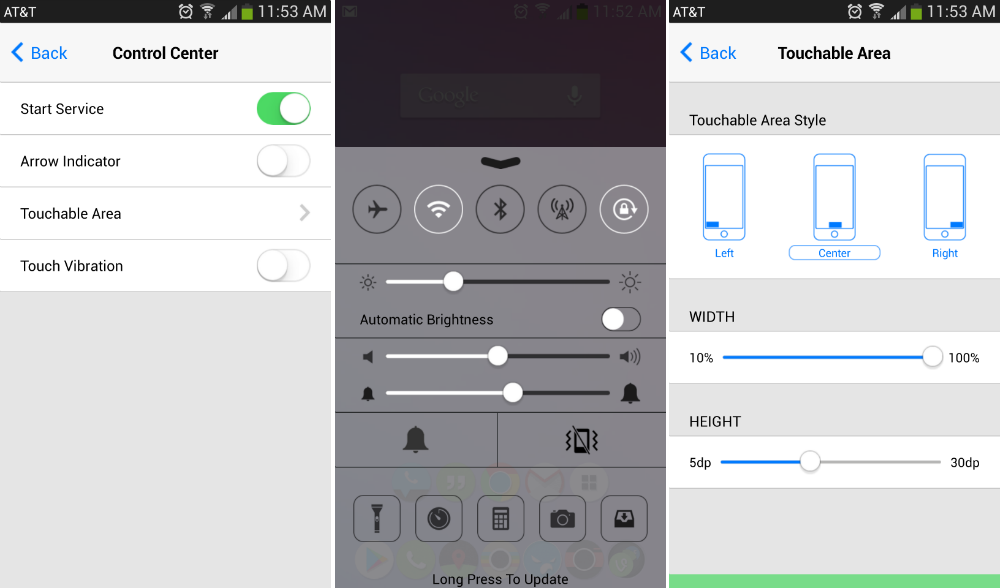
    • If you actually tried it first hand it’s not bad, I like it, it’s also pretty nice to be able to change brightness manually wherever, not just on set brightness levels. I prefer Control Center than the quick toggles, just me I guess. There’s app that can do that on Android, but none of them look polished and are buggy most of the time. Having access to camera is also pretty cool. They just need to work on Control Center more.

      • Yeah, I think Google could use this as a cue on what to add to Quick toggles. Also make the toggles…. toggles. Not links.

        Brightness control on the other hand is my favorite feature of TouchWiz – slide your finger over the notification tray to control it. This needs to be stock functionality.

        • I think that was in a few AOKP roms, you could just slide your finger across the top part of the screen and it would change the brightness (I think its along the same lines, I haven’t actually used a TouchWiz based device tho).

    • No, you are definitely not the only one! The whole font, color scheme and even the way the icons / toggles are arranged make the interface seem cluttered.

      On another note it is kinda cool that an Android dev can put out a stable(ish) release of an app that offers functionality Apple only publicly released a month ago.

    • You are not the only way. All Androiders think the same thing about that horrible OS.

    • It would be cool to use only to make those die hard Apple fans cringe! Especially because this app is completely functional while Apple won’t release their version until this fall.

    • my roomate’s sister-in-law makes $86 every hour on the laptop. She has been out of work for seven months but last month her paycheck was $21554 just working on the laptop for a few hours. Read more on this web site http://www.pro67.com

  • If I wanted that, I would buy the iDroid 5S when iODroid 7 rolls out. No thanks.

Comments are closed.

back to top