
 Kellen
On an iPhone, you can make a sticker out of just about anything by simply long-pressing on it. It’s one of the handiest features for creating a goofy little image to send to friends and family. Today, Google is bringing a bit of that magic to Android by allowing for custom stickers to be made through Google Photos.
Make Google Photos Stickers on Android
In order to make a sticker in Google Photos on your Android phone, you’ll likely need to be on the latest version (7.64), plus Google says you’ll need to have at least 4GB RAM in your phone. That should be most of you.
You’ll open Google Photos, open an image you want to make a sticker from, then long-press on the area within the image that you want made into a sticker. If the image allows for sticker creation, you’ll see a glowing highlight (“shimmer effect outline”) around the area that will be turned into a sticker. You’ll see an option to “Copy sticker,” which pops up a screenshot share window that allows you to share the sticker elsewhere.
Below, I show a sticker being made of the greatest champagne the world has even known, Cook’s Extra Dry.
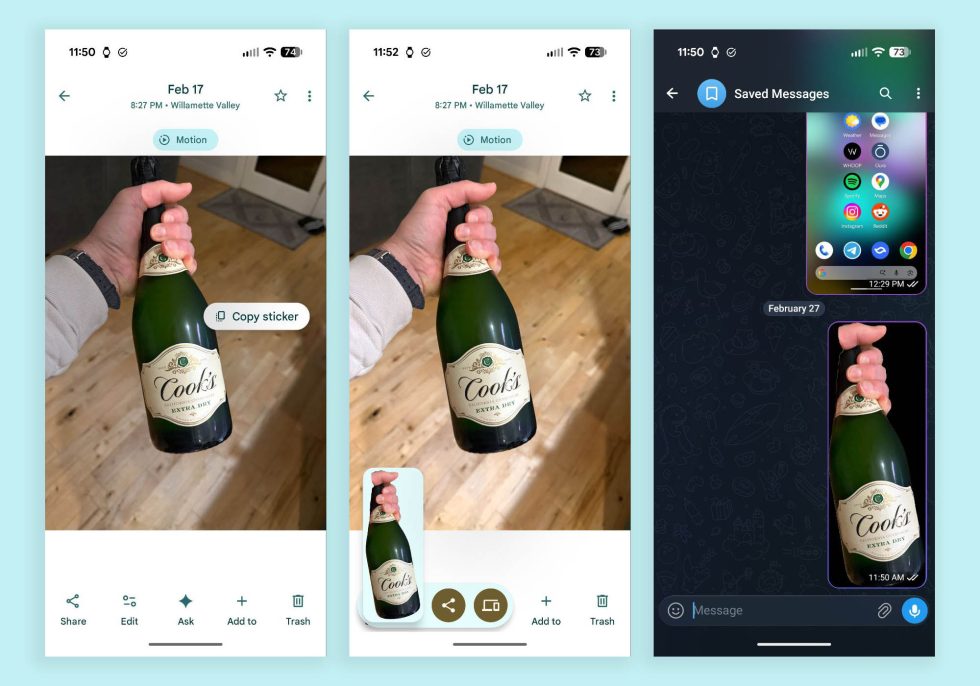
It works OK, but I’d imagine it can get better over time. Still, we’ll take it! Making stickers is fun.
Google Play Link: Google Photos
Collapse Show Comments1 Comment