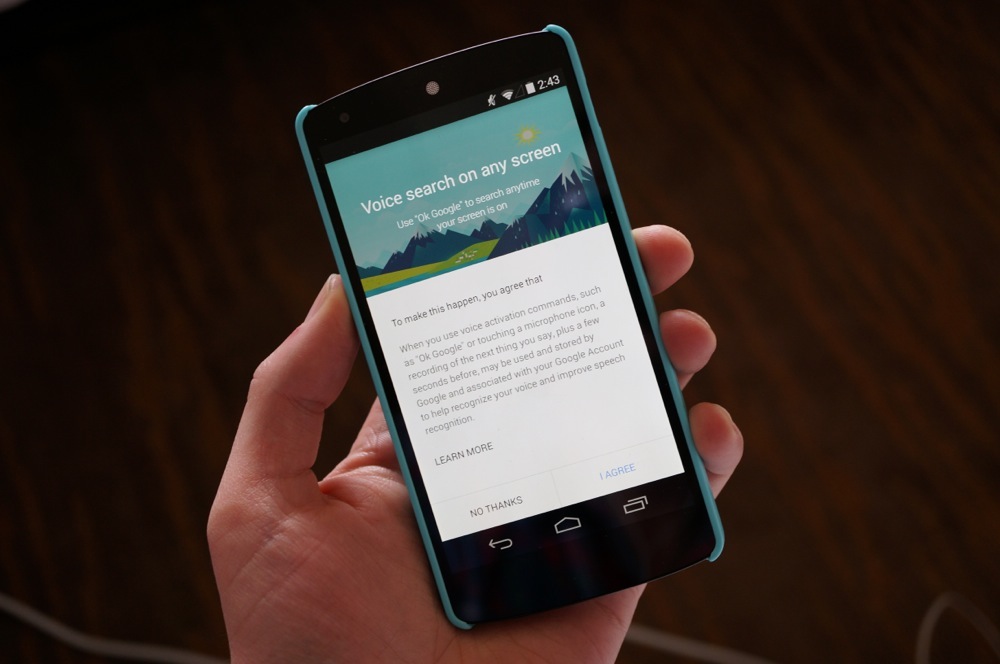
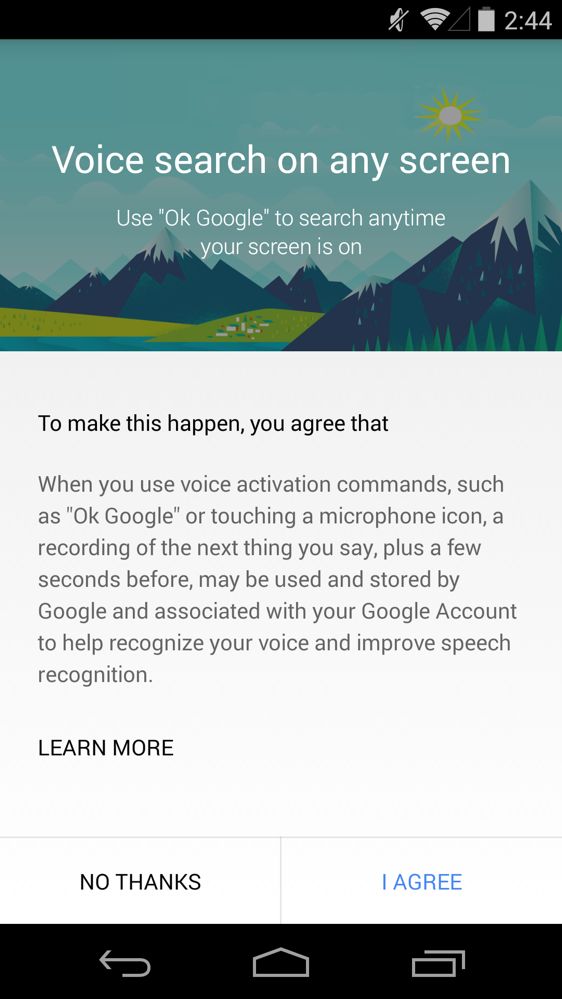
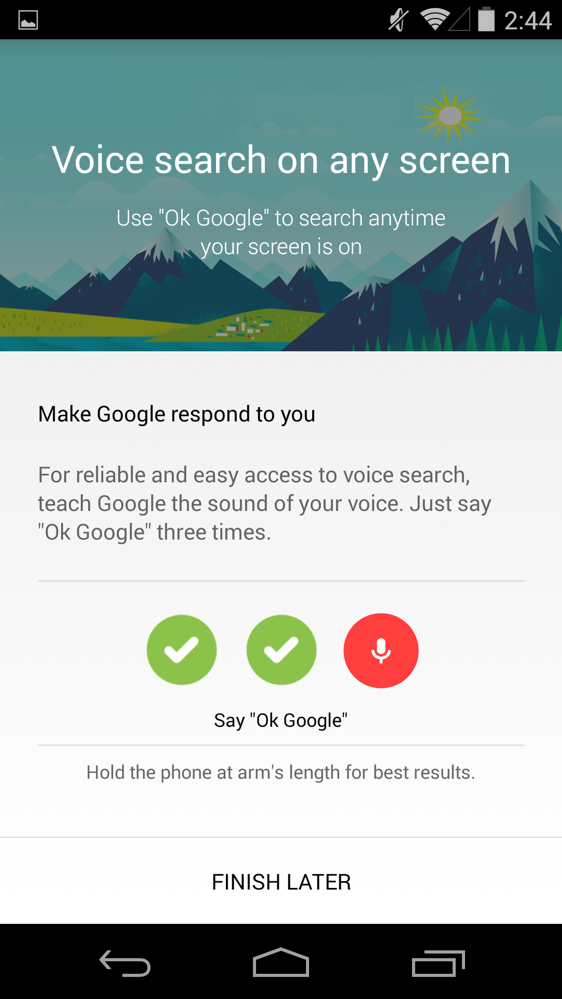
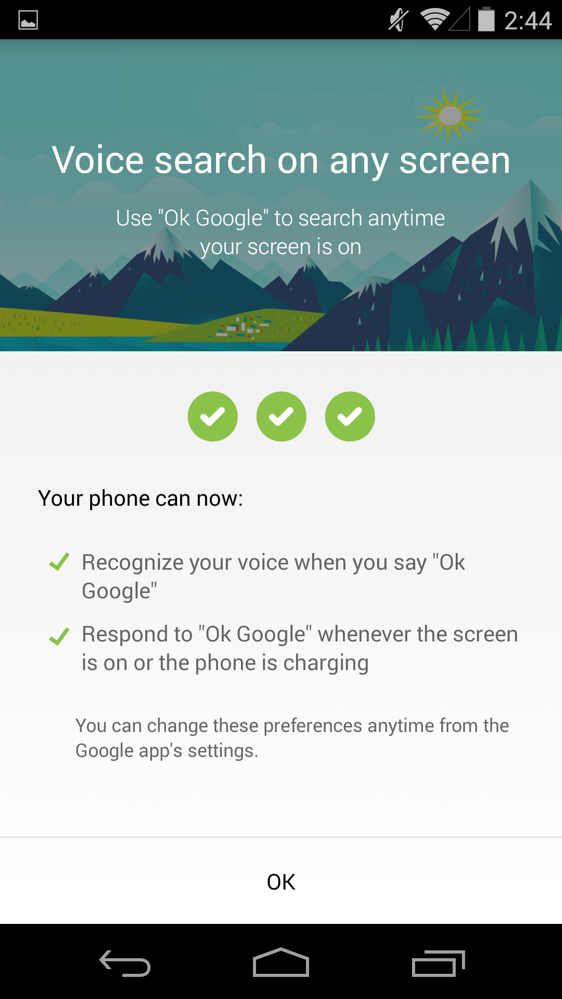
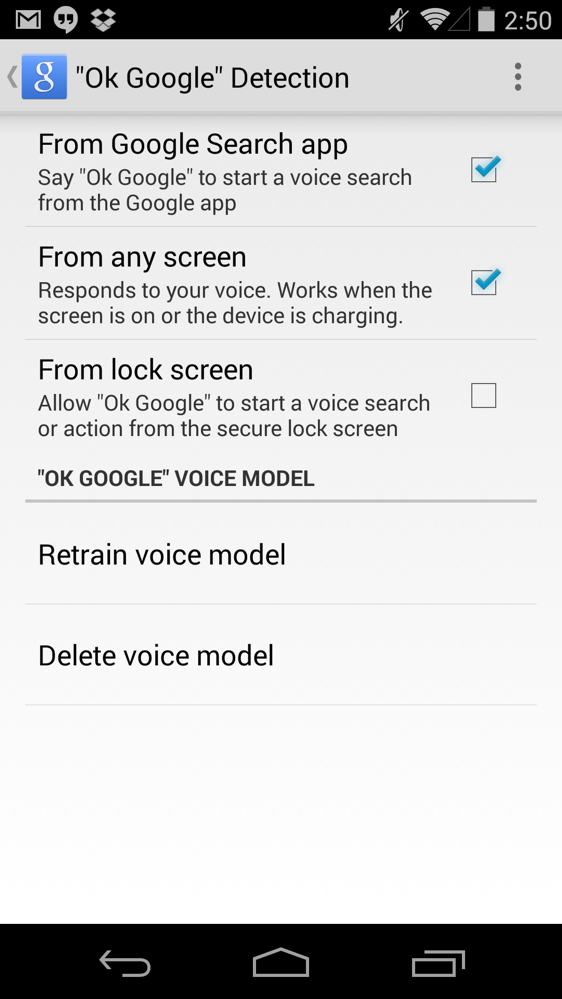
Google Search 3.5.14 is beginning to rollout with a couple of major enhancements. First, Google is allowing users to enable the “OK, Google” hotword to be said from anywhere on the phone to prompt a voice search. So rather than having to be on your home screen, you can now be in Chrome or looking at photos and quickly kick off a voice search. The update even allows you to trigger an “OK, Google” from the lock screen. It works quite well so far in our testing.
To turn on the new hotword detection, head into Google Now, then scroll to the very bottom, tap Menu>Settings>Voice>”Ok Google” Detection, and then toggle on the options you desire.
The app doesn’t just bring new hotword glory, though, it also introduces Audio History. As the name suggests, Google is using your voice searches to create a history that it can use to make your searches more accurate. It learns the sound of your voice, how you pronounce words, etc.
In case that scares you on a privacy level, Google is letting you opt-out if you’d like. You can read more about this new Audio History at this support page.
[responsive_vid]


Could anybody tell me why my ok Google isn’t working. I went thru all the settings and it just won’t work… it’s been 2 days already. It’s driving me crazy. .. thanks
I’m confused. I just got the Google search 3.5.15 update, but never got the 3.4.14 update. I have the N5, and also didn’t get the supposed new Google play services update either.
شركة القمة لنقل عفش
بالرياض
شركة نظافة بالرياض
تنظيف فلل بالرياض
تنظيف
خزانات بالرياض
نقل اثاث بالرياض
تنظيف مجالس بالرياض
تنظيف موكيت بالرياض
تنظيف شقق بالرياض
رش
مبيدات بالرياض
كشف تسربات المياه بالرياض
تنظيف خزانات بالرياض
عزل خزانات بالرياض
عزل اسطح بالرياض
شركة كشف تسربات المياه
بالرياض
تسليك مجارى بالرياض
تنظيف بيارات بالرياض
شركة عوازل
شركة عزل مائي
شركة البستان نظافة عامة بالرياض
شركة نظافة بالرياض
شركة تنظيف منازل بالرياض
تنظيف فلل بالرياض
تنظيف شقق بالرياض
تنظيف موكيت بالرياض
تنظيف كنب بالرياض
شركة نظافة عامة بالرياض
تنظيف مجالس بالرياض
تنظيف قصور بالرياض
شركة مكافحة حشرات
بالرياض
تنظيف فلل بالرياض
شركة كشف تسربات المياه
بالرياض
شركات عزل اسطح بالرياض
شركة نظافة بالرياض
شركة رش مبيد بالرياض
شركة تخزين اثاث بالرياض
تنظيف شقق بالرياض
تنظيف خزانات بالرياض
شركة تنظيف منازل بالرياض
نقل عفش بالرياض
شركة تنظيف مجالس
شركة كشف تسربات بالرياض
نقل
عفش بالرياض
كشف تسربات المياه
عزل خزانات بالرياض
مستودع تخزين عفش بالرياض
شركة تنظيف كنب بالرياض
تنظيف منازل بالرياض
جلي بلاط بالرياض
تسليك مجارى بالرياض
شركة رش مبيدات بالرياض
شركة تنظيف كنب بالرياض
شركة القحطاني رش المبيدات بالرياض
مكافحة
حشرات بالرياض
شركة نقل اثاث بالرياض
تنظيف خزانات بالرياض
تخزين اثاث
عزل مائي
شركة تنظيف اثاث بالرياض
رش مبيدات بالرياض
افضل شركة كشف تسربات بالرياض
كشف تسربات المياه
تسليك مجارى بالرياض
تنظيف بيارات بالرياض
عزل اسطح بالرياض
تنظيف خزانات بالرياض
عزل خزانات بالرياض
شركة
عزل حراري الرياض
شركة عزل مائي الرياض
شركة رش مبيدات و مكافحة حشرات بالرياض
شركة تنظيف منازل بالرياض
شركة نقل اثاث بالرياض
تخزين اثاث
رش مبيدات بالرياض
مكافحة حشرات بالرياض
تنظيف خزانات بالرياض
تنظيف موكيت بالرياض
تنظيف فلل بالرياض
تنظيف مجالس بالرياض
تنظيف شقق بالرياض
كشف تسربات بالرياض
شركة كشف تسربات المياه
بالدمام
شركة رش مبيدات بالدمام
شركة تنظيف خزانات بالدمام
شركة تنظيف بيارات بالدمام
شركة تسليك مجاري بالدمام
شركة مكافحة حشرات بالدمام
شركة تنظيف منازل بالدمام
شركة
تنظيف فلل بالدمام
شركة تنظيف بالدمام
مكافحة
الحشرات ورش المبيدات
تنظيف بيوت بالمدينة
تنظيف منازل بالدمام
نقل عفش
عزل أسطح بالدمام
شركة تنظيف خزانات
بالدمام
نقل عفش بالمدينة
عزل أسطح بالرياض
تنظيف فلل بجده
شركة تنظيف منازل بالخرج
عزل أسطح بالدمام
نقل عفش الدمام
شركة
تنظيف بيوت بالرياض
اسعار نقل العفش بالرياض
شركة نقل اثاث بالمدينة
المنورة
شركات تنظيف المنازل في جدة
شركة نقل اثاث بالرياض
شركة تسليك مجارى بالرياض
شركة
تخزين اثاث بالرياض
شركات رش المبيدات الحشرية
بجدة
شركه تنظيف خزانات بجدة
شركة تنظيف بمكة
شركة نقل اثاث بجدة
شركه
تنظيف خزانات بالدمام
شركه
نقل اثاث بمكة
شركة نقل اثاث بالدمام
شركة تنظيف منازل بالمدينة
المنورة
شركات عزل مائي
شركة مكافحة حشرات جدة
تنظيف فلل بالدمام
شركات مكافحة الحشرات فى
الرياض
تنظيف
خزانات بالرياض
عزل اسطح بالرياض
تنظيف فلل بالرياض
شركات عزل اسطح بالرياض
عزل خزانات بالرياض
تنظيف خزانات بالرياض
تنظيف بيارات بالرياض
تخزين اثاث
شركة تنظيف بيارات بالدمام
عزل أسطح بالدمام
شركات تنظيف المنازل في جدة
here
here
here
here
here
here
here
here
here
Anyone know what is new in this Google search 3.5.16 update that just got updated on Google play for me??
Update – cool feature-BATTERY assassin
Just got the option – had update for days – hang in there people
Also…. :-/ Galaxy Tab3, doesn’t work at all, unless one initially presses the microphone icon. (perhaps someone can confirm/deny?
Only works from the main screen on the Galaxy s5, No settings to allow it to “listen from any screen”.
I’m confused. I just got the Google search 3.5.15 update, but never got the 3.4.14 update. I have the N5, and also didn’t get the supposed new Google play services update either.
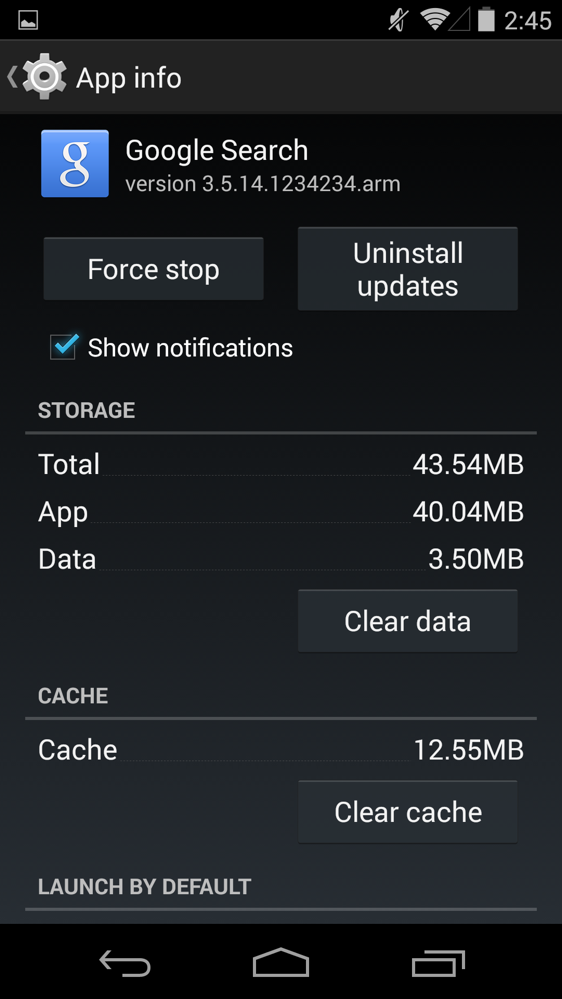
I’m running 3.5.15 with Google Play Services 5.0.84 and still nothing. I haven’t tried installing the apk for 3.5.14 so maybe that’ll work.
I just notice my search apk is 3.5.15 not .14 I didnt know an updated one was out already
Same I wasn’t aware there was a 3.5.14
this still isnt working… come onnnn goog, push it real good.
I am nt getting the update on my moto g , What to do ?
Anyone actually see this work on the N4? Wondering if its a N5 exclusive or if they are just REALLY slow about pushing this out.
I’m on N5 (KK4.4.4) with latest versions of Google Now and Play Services sideloaded a few days ago, still no sign of the new hotword option. I’m getting really annoyed lol.
Really slow. I turned on my N7 2012 and its updated with the new features. On my N5 nada
I finally got it. If you still haven’t (although by now your probably have) it looks like searching “OK Google Everywhere” turns it on.
I loaded this on my droid maxx and nexus 7 v2. I love the new chime.
Think I need to update my nexus but the sky go app said it won’t work on new os so I turned off auto update for that tho have been after this feature for awhile w/o rooting…OK thanks Google
Use the app called open mic, and not only can you use “ok google” from anywhere, you can even use it when the screen is off, on any device.
Mine was working fine . even from lock screen , now its everywhere but the lock screen , anyone have a list of which flags should be on and which should not be on ?
I don’t have it too, but saw in the help file on Google, it works only on devices with Android 4.3 and higher, so not for me with Android 4.2. Me <- SAD
It’s available only for nexus or all devices on 4.3 and 4.4??
Ya so I have version 3.5.14.1234234.arm and I don’t have those options there. I just have the “Ok Google” detection from the home screen. Anyone else having this issue? Thanks!
I still don’t have it and I’m on the same version and android “L” even.
Is this just a Nexus option when launching from any screen? GNote 3 only options to search from Google app, not any screen.
Apk plz
I was lead to believe there was an apk here for this feature. I haven’t found it here in this article.
Look through the comments it’s in here.
“You can force OK Google everywhere to be enabled. Enable debug/dogfood settings by using UnleashtheGoogle, found here. http://coggy.euroskank.com/APKs/UnleashTheGoogle.apk
Force stop Google Search once UTG has ran, then go into search settings, then config flags. Enable both e300 toggles, add your country code(en-US for USA) in “speaker_id_supported_locales”. Save the config by tapping save config settings at the bottom.”
worked for me – note 3 VZW copied from Android police comment from coggy9
I just cleared app data and uninstalled updates, then updated google search from the play store and boom, works like a charm.
it worked for me. Hotword is not available in Argentina, but this setting starts to show Audio History. “Ok Google Everywhere” is not available yet at least.
I haven’t been able to update. Like that option. Really almost get a moto Macclesfield. No I can show my dad how is phone isn’t better than mine no matter what he thinks
Installed the APK, Only on search screen listed. Must need google play services update or something
I can’t get it to work. I’ve updated play services and Google search and other than the beep tone change, I don’t see a difference. The settings pages have not updated with it. I rebooted a couple times and force stopped search to try and get my phone to see the change but nothing works. Anyone know how to jump start the process?
don’t work (I’m from Russia) maybe app-version doesn’t matter?
So how do you know when the switch gets flipped on? Does the app reset itself?
upto I looked at
the receipt which said $7471 , I accept …that…my mother in law woz like
they say trully erning money in their spare time from there computar. . there
mums best friend has done this less than twenty one months and a short time
ago cleared the loans on their condo and bought a gorgeous Lancia . website
link wℴℛks77.ℂℴℳ
Has been working fine on my Nexus 4 ever since I installed it, but I’ve been experiencing terrible battery ever since I updated; slept with 94%, woke up with 71%
Google search has updated twice in 24 hours and this feature is still not available. What’s the deal?
Is this working for the Nexus 4? I updated Google Search but it doesn’t even show the option.
Does anyone have the app for the newest version of the Google now launcher? Play store link says not compatible yet. I’m on a s4 kitkat. Thanks
Just uploaded it. Here you go: http://www.androidfilehost.com/?fid=23501681358553126
Just like that… thanks…
OMG!!!! Nexus 5
upto I looked at
the receipt which said $7471 , I accept …that…my mother in law woz like
they say trully erning money in their spare time from there computar. . there
mums best friend has done this less than twenty one months and a short time
ago cleared the loans on their condo and bought a gorgeous Lancia . website
link wℴℛks77.ℂℴℳ
until I looked at the receipt four $5584 , I didn’t believe that my brother was like actualy taking home money parttime on their apple labtop. . there friend brother has been doing this less than 12 months and a short time ago repaid the dept on their place and bought themselves a Renault 4 . visit this site
…………………………………………….
WORKS77.COM
My Uncle
Riley got an almost new red GMC Canyon just by some parttime working online
with a laptop. visit their website Fiscalpost.COM
Just got this update on my nexus 4 and no joy on OK Google everywhere. The option doesn’t even appear in the settings. Looks like the feature is limited to specific models.
I have a Nexus 5 with the update and don’t have the settings either. I was thinking it’s America only.
It’s on a per account basis, Android police reported it
Doesn’t work on Nexus 4 *sigh*
Crap! Mine only updated to 3.4.16(Vzw gnote3). Can I get a apk someone?
Maybe only works with ART and not with dalvik
I just want it to work. Why won’t it work!? Why?? Why!?
Sooo, didnt google stop learning the way we speak not that long ago? something about, voice search being effective enough. either way, i’m happy to have it around.
Do you have to be running 4.4.4?
Touchless Control says “hi.”
I’m confused. I thought I had to say “OK Google NOW” on my Moto X. What’s the difference between “OK Google” and “OK Google NOW”?
That OK Google now takes you to the Motorola voice services first (find my phone, what’s up, etc). OK Google just take you to Google now to voice search
Mind sharing the apk
And there it goes Motorola’s Edge…
isn’t that ideal for consumers though?
Not for the consumers that are going to sell their X’s to get the X+1 (or the next phone that wows me, it may be another one since they may integrate touchless in other phones), most likely gonna miss active display and the camera twist though
you lost me…if Google packs in new features that are similar or encompass OEM skin features so that everyone can enjoy them, that’s a win win. why should we care if those features are no longer exclusive to moto devices?
No, that’s not a win-win, it’s a win for consumers that use another flagship, but for Moto is a kick in the balls, they lose the bigger selling point they had. Optimized Kernel, Near Stock and Fast Updates aren’t selling points to the masses, so now Motorola is just an OEM that sells round phones with crappy cameras.
It’s not the same as a skin, it’s like Google took Boomsound and make it a standard for all phones, HTC would lose the few sales they have.
Not particularly relevant for any Non user of a Moto X tho, but this seems like the Lenovo sale is about to complete :B
it’s a win for Google, a win for Android users, and a win for the industry. Moto will have to find another way to innovate. it happens every day. why would you care so much about moto sales figures or moto having a competitive edge? if those are features you enjoyed so much, you should be happy you’ll be able to get them in a larger selection of devices. more choice is a good thing. for the life of me i cannot understand why you’d say this is not ideal for consumers selling X’s to get X+1….those folks are not impacted negatively by this one bit….
Of course they are affected, it’s the biggest selling point of the device. I care because I own one rofl 😛
I know it’s a win for the general population, but not for me (since I have one of the few dev edition Moto X in my country)
that mentality makes absolutely no sense, it’s completely illogical. you are losing nothing. so what if it was the biggest selling point, its still a feature, you aren’t losing it. it honestly sounds like your feelings are hurt because a feature moto had a lock on got trumped by Google. who cares. you still get to enjoy that feature, and now in a much larger selection of devices. if you want to buy an X+1, you’ll still have those features. if you decide to buy something else, you can still have those features. green grass everywhere you look bud…expand your horizons.
you’re not getting it so I’m just gonna try it one more time, it’s the biggest selling point, so when I want to resell mine (to get money to buy another phone) the phone is less special so it sells for less money, it’s not about what’s best for the general ecosystem, I’m talking of what’s best for my wallet (and Moto’s, but I care more about mine)
alright, now it’s clear your angle is your resale value…that wasn’t apparent to me……………
i think you’ll be alright. personally, i’d doubt customers on swappa or ebay will be considering a particular feature in Android L when determining a fair price for a used moto X….i think the most important thing is physical/functional condition and whether or not the next version of that phone is out, not necessarily other phones with similar features.
working late so while i’m waiting for jobs to run i gotta kill time somehow……
Yeah it will probably be alright if I sell on the uninformed market, but I mostly use a specialized forum, probably gonna change in this situation tho so I can get a better price
PS: didn’t actually thought you would answer this fast at this hour lol
I wouldn’t agree that this edges out the X. I have an old RAZR HD and my wife has a Moto X. If I’m in the kitchen doing something where my hands are dirty, I still have to touch my phone, even if it’s now only hitting the power button to get to the lockscreen. The X can listen without being touched.
It was actually my bad, I didn’t notice (until 3am -> 6 hours ago where I live) that you can have the phone “locked” but it needs to be active (screen on) and the only way to bypass this is to have the phone plugged in, so the X is not really losing its edge since the best part of touchless controls is… well… that they’re actually touchless
Precisely. I still think it’s a great add on for me, as I used to have to hit the power button, unlock, then swipe up from the home button in order to get the phone to listen to me, but it’s by no means a better setup than the truly touchless controls on the X.
I think it will be in the next years tho (when most devices have at least the Snapdragon 800-> low core processor for sensors and language)
I certainly think Google would like to move that way. It’s a great and very useful feature, and the voice functionality on Android phones has become a lot more robust, but they’re still going to have to have specific hardware to support it.
precisely, it looks like a gimmick but half of the time I’m using google search it’s with touchless (can’t when it’s tecnical language), like you said, for this to be pseudo default the hardware is still needed, but all the latest flagships (since last fall) should be able to handle the dedicated process like the One+1 does since they all have or the Snapdragon 800 or the X8. There is a big problem with this tho, the biggest smartphone OEM is going with their own voice services (that suck -> yeah Samsung I’m talking to you) so most of the Android community still doesn’t use the Google voice search at all 😛
I think we’ll see the truly touchless controls on stock Android (probably on the Nexus 5, first) with the L release. I read a rumor on Android Police that mentions that Google is working on this (the first step was allowing touchless activation with the screen off, but on the charger, which just came true).
So, the next step is leveraging that low-power listening core in Snapdragon 800 SoCs to listen all the time. Probably in an update to Google Search in the not-so-distant future.
I think that’ll happen when the S800 is more of a standard, in like a year or so
It’s in virtually all the flagships right now, as we speak, since fall of last year. I’d wager it’ll be a reality by this coming fall.
Besides Google has already thrown phones without SD800s a bone with the always listening while charging ability. It’s not EXACTLY the same, but it’s really nice to have (especially in the car).
just flagships tho, it can’t be made a standard if it’s on 10 phones
Where is the apk?!?!
I got the update… but i dont have that option for ok google everywhere, must be device specific. I have a nexus 4
It’s rolling out per account. http://www.androidpolice.com/2014/06/25/apk-download-google-search-v3-5-14-brings-ok-google-hotword-detection-to-any-screen/
Cool… Thanks for the heads up
Does not work for me!!
It looks like its rolling out per account.
Not available on Verizon Moto X . . . 🙁
Even so, when will we be able to train our own launch command? Maybe it’s just me(?), but I REALLY hate “Ok Google Now”…Why can’t we already just train our own phrases? Only reason I can think of is cohesiveness for Google marketing purposes.
Unlikely. Having a hard-coded, easy to understand command helps with efficiency.
Wow. I bet this means we can finally trigger Google Voice Search from a BT headset instead of getting that old voice dialer.
I can’t wait to try that out. Sweet.
Kellen posted this from the Enola Gay… Just dropped this giant bomb and flew away to watch the aftermath of fail from a distance.
it works for me. Installed both google search 3.5 and latest play service. Need english US to work tho. =)
stock N5 or what?
well, it is Purity ROM.
Now once they get this going when my N5 is asleep… Goodbye moto x.
Exactly. That’s what I’ve been waiting for on my N5.
I think we’ll have to wait for the L release for that to be happen, though. Can’t wait.
L release will be coming very soon, well, at least the beta version or whatever they’re calling it.
Yes, indeed. I might even give it a try myself.
I may wait and just see what these sites dig up first, though. Then take the plunge when I’m ready.
You think you’ll be able to try L beta on OEM phones or just Nexus? I have GS5
Google Search 3.5.14 basically makes any Android phone that receives this update a Moto X with Touchless controls. The Moto X is no longer unique in this regard anymore. I’m still waiting for the update but does this also work from the lock screen ?
Except for the part where you still have to touch your phone.
Except for the part where other phones don’t have a low power dedicated listening processor core…
Snapdragon 800 and up has the core. No sensor core, though.
Well. It actually does have a low power sensor core.
You can see it in the first figure, on the right side: http://www.qualcomm.com/snapdragon/processors/800 .
I know, but no manufacturer uses them. I’m willing to bet that this update doesn’t use them either.
I don’t think the low-power language core will get used until the L release. We’ll probably see it used on the Nexus 5 first when that update arrives.
There have already been rumors from Android Police about touchless controls happening soon, even when the phone’s screen is off (for phones without a low-power core, they’ll need to be plugged in). I think this system wide OK Google is just a stepping stone towards that end.
I’m not sure about that. The article says nothing about using the hotword when the screen is off.
On my S4 I see the options but it looks like it’s only available for US english at the moment. The weird thing is that it won’t even recognize my “ok google” when I try to do the setup process with the language changed to us english. There is also a new option to train the voice engine but that keeps greyed out for me doesn’t matter which language I choose.
Play services 5.0.77
https://copy.com/dcx4UVjSdyUa
Still can’t see the update after installing this services version on n5.
Reboot?
Yeah nothing still.
Don’t worry, it’s not working for most people.
cleared data and rebooted with nothing…
Ya it isnt working for me with new play services either. I’m on GS5
If I install this on my Moto X and say “OK, Google Now”, does that mean that it will trigger Search briefly, then the Touchless Control?
That depends on whether you can get Google Now’s hotword detection working at all.
@disqus_byS20xDW96:disqus @droidronin:disqus This feature doesn’t work on the Moto X or it Droid brethren for this reason.
All these comments and no one can include what version of Service they have lol
Using Play Services 5.0.77 on a GPE HTC M7 with Search 3.5.14.1234234.arm and in the Voice settings of Search, it only shows hotword detection in the Google Search app, and nothing else like shown above.
I have 4.4.52 and I can’t see this new feature.
Edit: Installed 5.0.77 on n5 and still can’t see the new features. Oh well, I still have nova launcher 🙂
Is this tied to GEL? I use Apex launcher with Xposed Ok Google for 3rd Party Launchers module and I’ve been enjoying this exact feature sans the lockscreen hotword since the module became available. With this Google Search update, does it make MohammadAG’s module redundant? Also, do we need Google search bar on the home screen for it to work?
They opened the hotword detection up to any app, if you select the option. So no, you don’t need the search bar on the homescreen and yes, MohammadAG’s module would be redundant.
Shows up on My Moto X but hotword detection in Google Now is still broken. Is hotword detection still broken for anyone else? I heard 4.4.2 fixed it for some…
working like a charm on my S4
does not work on the moto x, probubley to stop confusion for the phone. still wish I could change the speech words to just ok google insted of ok google now.
US only? just installed on my Nexus 5, under “OK Google” Detection I only get from Google Search app…
Read the rest of the comments before you comment, your not the only one who’s having issues with it not working.
Now I don’t need the OK google xposed module.
If you use Nova Launcher you don’t need that module. He’s got that option built into the launcher.
Cool. Thanks for letting me know.
Can we shrink the major McDonalds add on each page. It keeps auto playing and over taking the audio on the videos that you guys have posted.
Yeah, it’s probably the biggest ad I’ve seen on the Intarwebnetz in all my years of being a netizen.
Updated using the apk posted. Don’t have any options to allow OK Google from any screen. Perhaps because I’m using a G2?
It’s happening on Nexus devices as well. Probably something Google needs to enable on their end. They’re probably just doing a staged roll out at this point.
That’s what I figured. I’ll just wait until I get the official update.
Go to setting in the app then voice then make sire you have audio history turned on. Go to okay google detection profit
Those options simply aren’t there for everybody.
This isn’t an option for me on my G2 after updating using the apk. Oh well.
Kellex, what version of Google Play Services are you running?
I’m really digging the subtle change in sound effects when the hotword is detected
From the support page linked in the article:
“”This feature is currently unavailable on this device” error: The “Ok Google” on every screen setting is not available for Moto X or Moto G, and other older Android devices.”
So those of you not getting this to work on your device, blame Droid-Life for failing to test this on multiple devices.
Audio history isn’t new. I remember browsing throuigh my audio files on ICS or Jellybean? And then they removed the option to view your audio history. i guess they added it back.
Well, it used to be included, then Google got rid of it. Now it’s back.
What version of Play Services are you using? This isn’t working for a lot of us. Thx!
The Moto X had this as a phone already but it’s nice that Google decided to update the Google Search app as well for the same purpose.
Doesn’t work on my N5 or N7(13). Does this need the new Google Play Services update as well?
Doesn’t on my Droid MAXX either. The two options Kellen mentions aren’t even there to select. However, it did update and the Google Search listening sound is now slightly different.
Yeah I also noticed that the listening sound is different.
So how is this different than what the Moto X does?
It doesn’t work with the screen off
So, Moto is still better in that sense.
The audible history sounds cool, hopefully my moto will push the comments into the history too!
yup! Also, the fact that the Moto X uses the low power natural language processor. Keeping battery life usage to a minimum. I don’t know if Google Search can take advantage of Qualcomm’s 800+ voice processor. (or however it is that they have a low power always listening mode, that is not utilized in any devices)
Yup and technically without the update you can say “okay Google” instead of “okay Google now” with your Moto X but its not 100% affective lol
You can retrain your Moto X’s Touchless Controls with “Okay Google.” Using “Okay Google Now” reduces the chances of false positives though.
Nice did not no that 🙂
It’s utilized in the note 3 and s5
The OPPO Find 7a uses it. I think the OnePlus One uses it, too. 😉
Android Police had a rumor a few weeks back about the feature where it will activate Google Search from anywhere, and even with the screen off using a voice command, when on the charger (that rumor just came true). That same rumor said that devices with low power listening cores (like the N5) will get the always on listening soon enough, so we’re almost there. 😀
It doesn’t work with the screen off… yet. I’m sure there’ll be a mod soon enough
Only if you have a dedicated low power core for voice recognition… Which pretty much just means the Moto X and Qualcomm 800+ SoC devices.
I have a galaxy s5 and it works when my screen is off ^^;
What version of Google Play Services do you have?
How? I have one as well and would really like to know how? If it’s using car mode, never mind.
It’s not, from what I can tell.
The last Google Search update had a pesky bug that had me choose a home launcher constantly. Was that ever fixed?
Just downloaded and I’m not getting the option on my Nexus 5 🙁
I don’t see it either
Same
I also don’t have those new options after installing from Kellen’s link.
Did you enable it in the settings? Mine works fine.
Yes, the only option is “From Google Search app”
Ditto, same thing for me on my N5. Running the 3.5.14 version with no new setting appearing.
Pics
There is no option in settings. What version of Services do you have?
4.4.52
Already updated. Still don’t have the option.
It doesn’t work for me even with the latest Play Services. 5.0.7.7
Same. Not working and I have the latest everything!
its apparently server side…well, thats what I have seen someone else say. I also have the latest GPservices, and the lates google app. but we have to wait patiently for google to flip our switches apparently. 🙁
Neither am I getting it on my nexus 7.can someone help
I’m not getting it on my Nexus 4 or my Nexus 10! Very annoying!
Probably needs to be enabled at the account level. I got the update, but those options aren’t available yet.
This doesn’t work on my Nexus 5.
Neither of these features appear on the version currently rolling out on the Play Store.
I’m a little confused here… is this going to work for someone who runs Nova Launcher. I know Nova has the option for the hotword from the homescreen but if I turn that off, turn the Google Search hotword on will I still be able to use this? At one point Google Launcher was backed into Google Search but it seems to be two separate apps now.
Supposedly it will work in any application.
I’m waiting for the day when I say “Okay, Google” and 10 devices go off around my house.
“Ok Google format sD card, call police, cash out retirement.”
Why call the police though?
I don’t have those additional options like “From lock screen” or “From any screen”.
Yes same thing for me, i checked it, unfortunately these functionality is not available for the older versions of android, mine is 4.2.2 that’s the saddest part, they started considering 4.2.2 as an old android. Pretty much new apps with some pretty cool features even the launchers are somewhat not made for 4.2.2. Time to upgrade for myself, I guess. All the best.
SC
Don’t you already have “Okay Google Now” everywhere?
On Moto G, no.
THIS IS EXACTLY MY PROBLEM
yes
Because he just killed that hooker to get his money back and needs to format the pics he took on it of her and use his retirement money to flee to Europe. =p
That didn’t answer my question.
Indeed, the only reason I can reckon is that he needs someone to “take care” of his dog.
Win!
And Decltective of the year award goes to….
Dam, Living a GTA Lifestyle
Just citing examples of how you could wreak havoc on people activating a search while their phone is locked. Maybe voice recognition could eventually be user specific.
Isn’t voice recognition already specific to an individual user? I know on my Moto X no one can activate it because it only recognizes my voice.
Depends on the training. A coworker actually manages to activate it imitating my voice at the third or fourth time
Your coworker deserves a slap for trying to mess with your phone.
Half the time, my Moto X doesn’t even activate using _MY OWN_ voice. However, it sometimes pops on while listening to podcasts in my car… I’ve even tried multiple times to retrain it. It worked great in the beginning, now it barely works at all. Other Moto X stuff still works dandy.
It already is user specific. Try it out, it’s awesome.
I like to wait until someone is demoing the Moto X at my local Best Buy, then from an aisle down yell “OK GOOGLE” and see the reactions when the phone drops whatever they’re doing for the voice prompt.
Or just walk by people and go ” OK google, search for horse porn”
Exactly… the opportunity for trouble seems wide open.
Just like that purdy horse.
It’ll only respond to your voice (assuming you turn on the voice data)
I’m actually really curious how that will work. Right now on my Droid Maxx, it’s “OK Google Now” and on Glass it’s “Ok Glass” but when I’m sitting in my car, with Google Auto, wearing my G Watch with my Nexus 7 in the car and I say “OK Google” which one will answer? And what about more complex commands like “Ok Google, Play Bonobo Radio”?
Well, Google Auto is powered by your phone, and the Google would contextually know you are in your car, since the phone it is connected to is docked in the Google Auto cradle/plug, so likely just your car would answer, relaying it to your phone, which may show the response on your watch (play/pause controls for you now playing music). It is all “contextual” and would figure itself out. My phone already knows when I’m in the car due to either being connected to my car BT, or from the movement/noise (I have a Moto X). It will read me my text messages and automatically starts my podcast player.
okay google wash my car
Buy and sell E-currency like Perfect Money, Skrill, Bitcoin,
Ego-pay, Ok-pay, STP, Web-money on very compatible exchange rates. To get
advantages from our services, have a look upon this…. goo.gl/0OM5AR
my
friend’s step-mother makes $77 hourly on the laptop . She has been out of
work for five months but last month her payment was $14424 just working on
the laptop for a few hours. see it here
www.woRks77.com
Already activates my phone when I use OK Google in Chrome on the Desktop!
Why doesn’t this work on my HTC One???
Quick! Somebody post up an .apk!
Does “Okay, Google” work if the device is asleep (locked, with the screen off)?
Yes, but only if its charging.
Huh, too bad. Was wishing it was going to be more Moto X-like…oh well.
This is good. Damn good.
Doesn’t work on my Nexus 4, my Search app updated this morning to 3.5.14.1234234.arm. In fact, I don’t have those additional options like “From lock screen” or “From any screen”. Did you guys test this on just one device and think it works for all?
Same here. Not working.
Try going to Google Settings, open the menu, choose “Get Verification Code”.
And then do what?
It suddenly showed up for me……. I also UNINSTALLED Korean Keyboard. Perhaps it’s just a coincidence.
I think it possibly is just coincidence. What phone are you using, android version and which country?
Nexus 5. “L” Dev Preview. USA.
Me neither, I’m running Android 4.4.4 on N4, with the Google Search and Play Services versions that are supposed to work (via side loading)
before anyone asks… you know the APK download is coming… just wait.. Droid-Life is good for that.
Shhhhhhh…..
http://www.mediafire.com/download/idw8hrn109qnsaq/Google_Search_com.google.android.googlequicksearchbox_3.5.14.1234234.arm_300305140.apk
Boom! Atta boy. DL for life. shhhhhhhhh
haha thanks, K!!
Good luck getting it to work on your phone. Look like the feature is being rolled out in phases, despite whether you have the updated app or not.
Just installed on Nexus 5. I don’t have the same voice settings as your video :-/
Still doesn’t work on either N5 or N7 (2013)
Needs Google play services 5.0
Isn’t helping for a lot of people, myself included :/
Do you go into setting and enable “Audio History”?
Edit: Settings for Google Now Voice.
For those that it’s not working, that setting doesn’t exist – unless it’s somewhere outside of the Google Search app?
It’s complex. DL should explain it.
1. You need 5.0 Google Play Services and new Google Search.
2. Open settings in Google Now and go to “voice”.
3. Under “voice” enable “Audio History”
4. Select “”OK Google” Detection” and enable from every screen.
It worked on 4 devices for me across two users.
audio history isn’t there under voice, new google play services and google search.
And you’ve downloaded the Google Play Services 5.0 apk? Weird. Guess I’m lucky. I’m positive it’ll be pushed out for everyone soon.
Yep. Pretty weird how google is pushing this update out.
Yeah I wish #3 was there for me – must be random rollout. I’m digging through my Google settings online to see if it could be tied to anything there. 🙂
there is no Audio history option available for me
Same for me
It’s dependent upon account. It’s slowly being enabled across all users over the next few days
What this guy said x100! It will not work unless it’s been rolled out to your account.
Did it this exact way and it works. Galaxy s5
Apk didn’t work on Note 3. Installed, but sans option.
Woah!! NICE!!!!