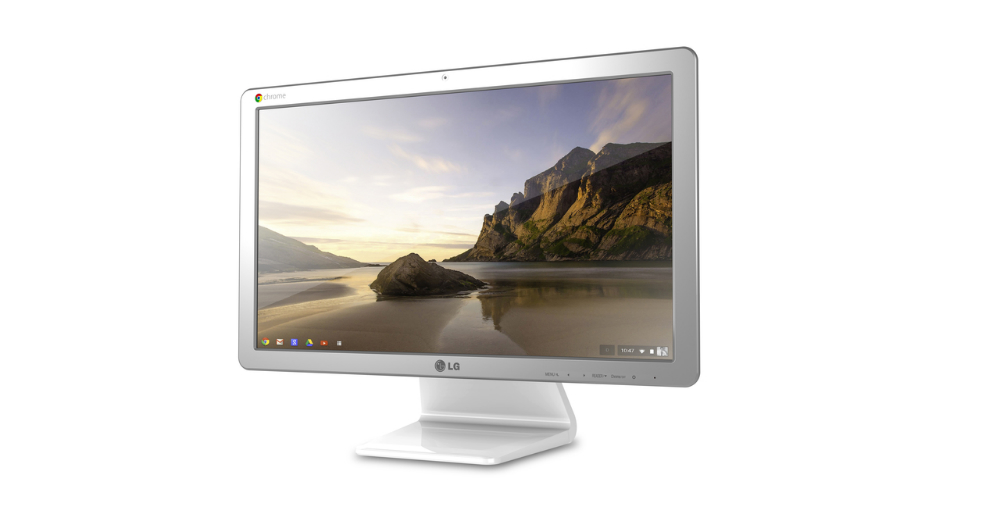
LG appears to be the first manufacturer to skip the laptop market with Google’s Chrome OS completely, moving straight into the desktop arena with the newly introduced Chromebase. LG will show off the “affordable” desktop at CES in January, then it should hit the market shortly after that.
For desktop specs, the Chromebase is running an Intel Celeron processor, 2GB of RAM, a 21.5″ Full HD IPS display (1920 x 1080), 16GB of storage, a 1.3MP built-in webcam, and a couple of accessories such a keyboard, mouse, and cable organizer. These are pretty standard specifications for a Chromebook, but then again, this isn’t a laptop. It’s supposed to be a full desktop experience.
LG gives us plenty of specs, but didn’t touch on price. Any guesses from the crowd? $500? $400?
Specs
- Processor: Intel® Celeron® CPU
- Operating System: Chrome OS
- Display: 21.5-inch Full HD (1920 x 1080) IPS
- Memory: 2 GB
- Storage: 16GB iSSD
- Ports: HDMI-in, USB 2.0 x3, USB 3.0 x1, LAN
- Accessories: Keyboard, Mouse, Cable Organizer
- Webcam: 1.3 M 720 HD
According to LG’s press release, we will have a chance to get our hands on the Chromebase at CES, so we will make sure to stop by the booth and check one out for you all.


I’m guessing $349. It is beautiful. I’d have no place for it though. This just assures us that they have even more to put into ChromeOS.
Biggest brick ever.
I’ve installed Ubuntu on my HP Chromebook 14, and I’m absolutely loving it! I’m thinking about running Elementary OS Luna on it.
What am I saying? ChromeOS Devices can be awesome. A little bit of tinkering, and you have a full blown laptop with apps. Throw some Wine, and some windows apps and you’re good to go.
Celeron processor?? I haven’t heard that since the AOL days.
2014 will be the year ChromeOS makes huge market gain. Microsoft pissed all of it’s oems off with the Surface and go at it alone attitude. Time to pay the price of alienation. I’m guess you’ll see ChromeOS marketshare hit double digits by years end.
You wish that could happen. Even Mac has a higher chance of gaining huge share than Chrome OS.
Not at their current prices they don’t.
ChromeOS has a chance to make major headway though, but only in the netbook market segment.
Overall market? No way.
Actually pc sales are trending down ward and have been for several quarters. ChromeOS is the only pc (ish) product seeing growth.
I got a 100 dollar bill that says it won’t make double digits.
Wanna roll the dice?
Right now they stand at 4 to 5 percent. If ChromeOS is a success in the education sector 10 percent marketshare is easily attainable.
Of course its all how the numbers are spun.
Its so limited, I don’t see how it would make it in the education arena.
Maybe grade school….
Chromebooks are actually almost perfect for students in K-8 and even high school, in many cases. My school is 1:1 with Chromebooks for 2nd-8th grade, and it’s been a great experience. There are more than enough web-based resources to fully complement integrating tech into the classroom. Teacher and students at my school generally like the experience a lot.
It is refreshing to get someone that actually explains why they disagree or from experience. Usually, as you can see, it is moronic fools downvoting.
I was all interested until I saw it runs on a Celeron.
If this thing costed a dime over $300 after all taxes and fees you are getting ripped off pretty bad.
1080p is a premium. So no.
LMAO, hardly.
That is the only spec that makes it even warrant a second look. Everything else was dug out of the bottom of the barrel of parts.
That doesn’t even make it worth a second look because you can get a 1080p 21.5 inch monitor just about anywhere for 80-100 bucks.
Yeah my computer has as much RAM as that has storage with an i7 or $550.
For that screen in particular I’d probably be shooting around 129.99 just for the screen.
1080p, 21.5 inch, IPS, LG
http://www.newegg.com/Product/Product.aspx?Item=N82E16824005363
Kind of a ripoff, when for less than 100 more, you could get a 27 inch IPS. I bought two HP 27xi for 219 a piece a couple weeks ago.
Would be tempting…but my next desktop will be some form of Steambox m/
Nice to see someone stepping it up on the display. I really hope Google does some great things with chrome os in 2014 and their partners step up their game in the display department.
The Pixel stepped up the display.
This is pretty run-of-the-mill:
1080p, 21.5inch.
Only the pixel but like I said their partners really have not. I’m hoping someone does soon
Yeah but…size…
Can you even buy a 21.5in display that isn’t 1080p?
Design wise it gets a 10. I don’t know much about the Chrome OS to give it a rating or risk buying one so I’d have to pass..
I’ll probably buy this. My wife uses Chrome OS exclusively (when she’s not on her Android, that is). There’s literally nothing that a traditional desktop offers her that she would use that she can’t already do on Chrome OS. Honestly, for my home computing, I have no use for anything more than Chrome OS were I not in school (need something that can do Java).
Processor: Intel® Celeron® CPU
DOA if it is above $250-300
Possibly DOA even at those prices considering you can get a dual core, 6GB of ram w/ 500GB hard drive plus monitor for about 350.
If a Celeron is priced above $300, you’re doing it wrong.
I have one of the Samsung Chromebooks and I also got a Samsung Windows laptop around the same time. Chromebook ran me $250 and the other was $300 on sale (usually $350). The Windows box has more RAM, a dual core (AMD, but still), 500GB HDD, larger screen, DVD+RW drive, full numpad; you know the drill. Outspecs the Chromebook on just about every count you could name.
Funny thing is, the Chromebook is a treat to use and feels like it was really nicely put together, and the Windows box is sluggish and frustrating while feeling like it was slapped together by a monkey with a hammer and $10 worth of parts. If I didn’t need Windows for school, I would never even open the Windows laptop, but I use and enjoy the Chromebook all the time (my wife uses it exclusively; she never even touches the other laptop).
So….what are you getting at? That Windows made the other Samsung laptop’s hardware crappily put together and bloated it up? Personally, I would blame Samsung for that one…
Just wait until OEMs figure out how to bloat up chromebooks…
I’m “getting at” the fact that specs don’t make the machine. Weren’t you getting at a higher specced machine for a similar price being the obvious buy?
You are talking apples and oranges though. Useful and enjoyable are not the same thing. I can enjoy a picture, but what can I do with it other than observe? Hence, enjoyable, but not useful. You even said yourself, if it wasn’t for needing Windows…so the Chromebook is more enjoyable, but less useful.
Besides, my reference was in regards to accepted industry prices for hardware. Its bad enough that Apple jumps costs because of their deemed superiority in the OS. Chromebooks won’t get away with that while there isn’t a comparable ecosystem for it vs. the giants.
The slowest Windows or Apple machine out there (lets be fair and say within the last 5-6 years) is infinitely more useful than a chromebook right now.
Right now, the most powerful feature ChromeOS has going for it is the ability to remotely access OTHER machines. That, IMO, is not worth much.
So if an OEM charges above accepted industry prices for hardware using ChromeOS (at the same level will be a tough sell as it is), they better be prepared for a rude awakening. You don’t charge premium prices unless you have the user base that is willing to pay.
Right now, that user base is the netbook market, which sees Chromebooks as a less expensive option than Windows counterparts. Jump it to the same price, and they will start looking at what else Windows can do. Jump it above that, and its DOA.
The Pixel sounds like a great machine, but it is one big flop. Why? Price.
My experience is entirely contrary to what you assert. I would purchase a lower specced Chromebook for the same price as a Windows laptop every time for myself and most family members’ regular usage (Hangouts, Facebook, light word processing, etc.). I simply haven’t found what you think to be true from my experience. Similar cost machines, same OEM, with the specs on the Windows machine blowing the Chromebook out of the water, yet the Chromebook would be my purchase every single time unless need motivated the Windows purchase.
Usefulness != usability. If I need to use Windows for a school project, I’ll open up the Windows laptop. If I just need to use a computer (word processing, web browsing, YouTube, etc.), I’ll reach for the Chromebook without fail over the “better” on paper Windows machine.
I may be more representative of the market than you think. The #1 and #2 best selling laptops on Amazon are both Chromebooks, and there are plenty of netbooks and laptops offered on Amazon for similar prices that look better from a strictly spec-sheet perspective.
Again, it is the price that is driving Chromebooks right now, not the experience.
Proof in the pudding: Pixel sales.
The Pixel is competing against very high end machines; not the target market at all. Chromebooks rightly are for casual users for internet browsing, and that price tag is well beyond that range. It would be like having a tablet at $1200; could be a great tablet, but no one will buy it. However, tablets are flying off the shelves at the lower price point that’s more in line with their function (not their specs, mind, but with the price people will pay for the function it serves).
Apples for apples (inexpensive computers used mainly for internet access), Chromebooks are outselling better specced, same cost laptops.
Meh. All-in-one PCs aren’t tempting to me. They’re sort of like the worst of both worlds–a desktop’s lack of portability with a laptop’s limited expandability and cooling problems. Not to mention that if that screen ever gets a crack or the backlight fails, you’re dealing with a shop instead of just replacing a monitor. However much this is, it’s not for me.
This is not a Windows computer, which means cooling issues and hardware upgradability take a back seat.
And screens don’t tend to crack unless you drop them. And if you’re dropping your computer, it doesn’t really matter whether it’s a laptop or a desktop or an all-in-one, the screen will probably crack.
Also, another option is to just get a Chromebox and just plug in your own monitor.
Not sure why Samsung is the only one making Chromeboxes…they should be cheap enough to produce.
FLOP before even hitting the market.
It won’t flop if they price it right.
one hundred million dollars
That would be 1* million dollars per that movie quote …
Please just sell me a $400 – $500 chromebook laptop that is very high quality. Haswell, HD touch screen, amazing keyboard and mouse.. thats all I need!
This times infinity
Pixel. Minus the haswell.
Almost triple the price kyle said, too.
The Acer C720P is pretty close. Only 1366 x 768 screen, though – and not sure about the build quality, since I’ve never played with one
http://www.amazon.com/dp/B00GSEOV7U/ref=wl_it_dp_o_pC_nS_ttl?_encoding=UTF8&colid=1J0OOQ18ICBUK&coliid=I1KUYUPA7MZEGW
yeah that one was so close but I want just a little bit more premium.. i can see myself wanting to watch bluray rips on it and the screen will upset me
The build quality is decent…but the screen is pedestrian.
As far as Chromebooks, screen quality is either amazing (Pixel) or a non-starter (everything else).
I’m ready to get rid off my last Window machine (a PC). That desktop would be a great replacement. Only 1 issue (the only reason I still have my HP AIO PC): existing peripherals (scanner and printer) don’t work with Chrome OS. Fix that (driver? Cloud printing?) and I am Microsoft-free! 🙂
Get a Google cloud print enabled printer. HP sells quite a bit
I thought about it but that would not fix my scanner issue. I’m waiting for a solution to both.
hmmmm maybe a cloud printer that has a web interface to where you can open up chrome on your machine, go to the printer’s site and order it to scan from the browser? That might work… someone seems to be able to do something similar here: https://groups.google.com/forum/#!msg/chromebook-central/Vq9s06x0Hco/KaSvWnKF2ewJ
Thanks J. I think I will be looking into a solution like that soon.
Switch to Ubuntu. This Cromebase Desktop will not be a good replacement for a Windows-based PC.
I think it will be a good replacement. I only fire up my Windows machine to do my invoices. I use only Chrome for that. But then I need my scanner and my printer that work only with Windows machine. For all the rest, my wife and I use a Chromebook (in the family room).
$349.00
Are we doing Price Is Right rules?
$1 Bob!
$2!
Bob: “Actual retail price is….”
I’ll bid $1.
The perfect ‘parent’ computer
Or school, or library…
I’m a parent and a power user, so…no.
You meant, the perfect ‘web browsing’ computer.
Does alot more than that.
Not for me it doesn’t.
Besides, his original comment was that it was the perfect ‘parents’ computer, implying it is for those who mostly just browse the web.
I know plenty of parents that whenever they want to visit facebook, they go to their search engine, and search for facebook, then click the facebook link……………. instead of simply typing facebook.com….. I think TopXKiller was over-generalizing all parents into one category…. This is more for the specific types which follow the example I gave above.
I know 🙂
Is there a point to having chrome OS on a desktop type computer? All I get from reviews is that it’s great for browsing the internet and little stuff, not for being a work hog like an iMac or desktop PC. I have my reservations about it I guess. At least it looks nice..
My first thought would be mom/dad (grandma/grandpa) who do only that – browse the internet. I can picture their old roll-top desk with the old Dell or whatever sitting on it. This seems like a reasonable upgrade for someone in that scenario.
This is what I was thinking as well. It doesn’t seem reasonable for anybody else
One thing I saw on another site was with the HDMI input it could be used as an option with a PC hooked to the screen for those times you only need to look something up instead of booting your PC up.
Better off using Chromium OS in a VM at that point.
My grandparents actually have a roll-top desk with a chromebook on it!
School libraries/media centers are perfect for these. A big screen to easily see, and not a mobile device to check out and have stolen.
This should be VERY cheap.. Celeron + No wifi? Just imagine if it was $200
No Wi-Fi? Come on.
They’d be completely crazy to not put wifi in there. Besides wifi isn’t going to add more to the cost.
I recently purchased a low end PC for my daughter and it didn’t come with wifi (I expected it to). What a PAIN IN THE ASS. Companies that provide only ethernet (on any of their models) need to be boycotted.
Desktop or laptop? If it’s a desktop, you can probably add a cheap WiFi PCI card for $10-$15. If it’s a laptop, then you’re right, that’s pretty ridiculous.
Desktop. I know I can add a card, but I mean, when you are expecting to set it up at night when all the stores have closed (and none are close anyway), it becomes a real PITA.
Especially when the router is downstairs.
Yeah, I can see how that could be a nasty surprise.
I ended up throwing a wifi repeater on it, but yeah, it was irritating.
I can’t remember a time when I bought a desktop that had a wifi adapter in it. always had to buy it separate. Especially in the case of building one, don’t think i’ve ever added a card, but i’m a nerd and wired my house 😉
Many, (Most?) decent motherboards include wifi on desktops these days.
My Mac does (go figure), and so did my tower before that.
Anyway, it was my fault all along by not paying attention, but I still think everyone should be including wifi these days.
True story, except the intel Centrino Wireless-N 2230 that is in the Chromebook 14 costs $15 brand new on Amazon. Just ordered the adapter today for my hp laptop that I’ll be running chrome OS on (existing 1030 isn’t supported by ChromeOS).
$399
looking at those specs i believe your right on the money