
 Kellen
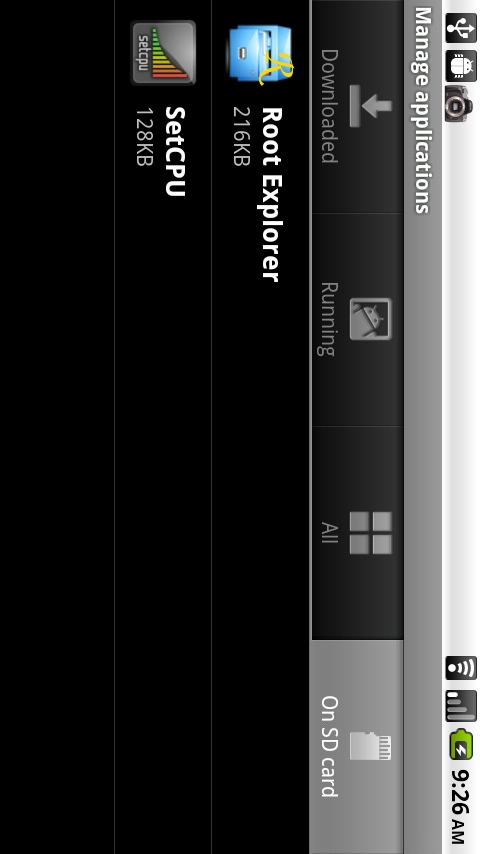
Moving applications over to your SD card in Android 2.2 is actually incredibly simple. The problem right now though, is that it’s up to developers to actually allow their apps to be moved to the SD card. While many of you are not seeing the option to move them, as you can see from the screenie above, I was able to do it with a select few. Just be patient! Developers are still just getting used to Froyo!
Instructions…
1. Open Settings>Applications>Manage Applications.
2. Tap on the application you wish to move.
3. Tap on the box to “Move to SD card.”
4. Done! Now tap on the “On SD card” tab to see that your app has moved.
You can also move the app back to your phone by tapping on the the same app and selecting the “Move to phone” button.
Update: If you want to force move an app to the SD card, you can do so in Titanium backup. Simply long press on the app you want to move and choose “Move to SD Card.” Then if you go into Settings>Applications>Manage Applications>SD Card tab, you’ll see your app listed. You will also see a “Move to phone” option if you tap on it now. Awesome right? Cheers Androfan!
Simple right? Besides the 2 up above, what other apps have you found that will allow SD card storage?
_______________________________________________________
Other Motorola Droid Froyo Goodies:
Download and Install Froyo | Download Flash 10.1 for Froyo | Video: Froyo Walk-through/Overview
Froyo Overclock Kernels | New Froyo Baseband | More Froyo Tips
Tip: Move Apps to your SD Card | Tip: Watch Hulu on your Droid | Tip: Use Chrome to Phone
Collapse Show Comments134 Comments