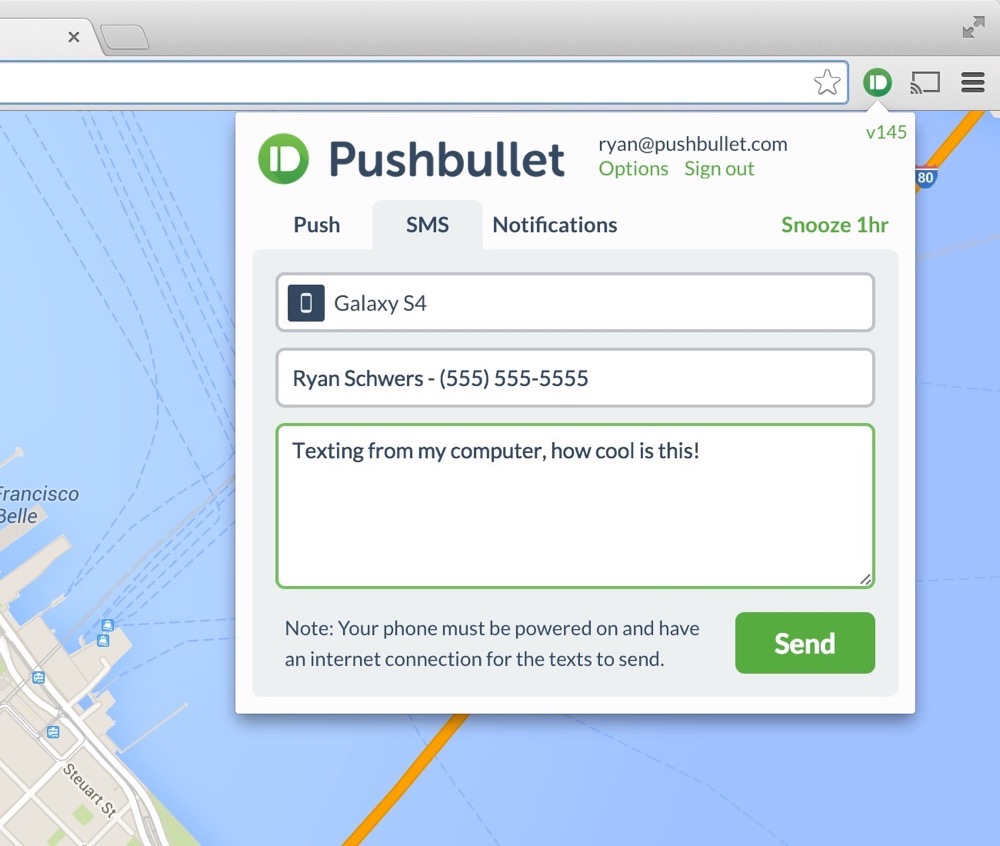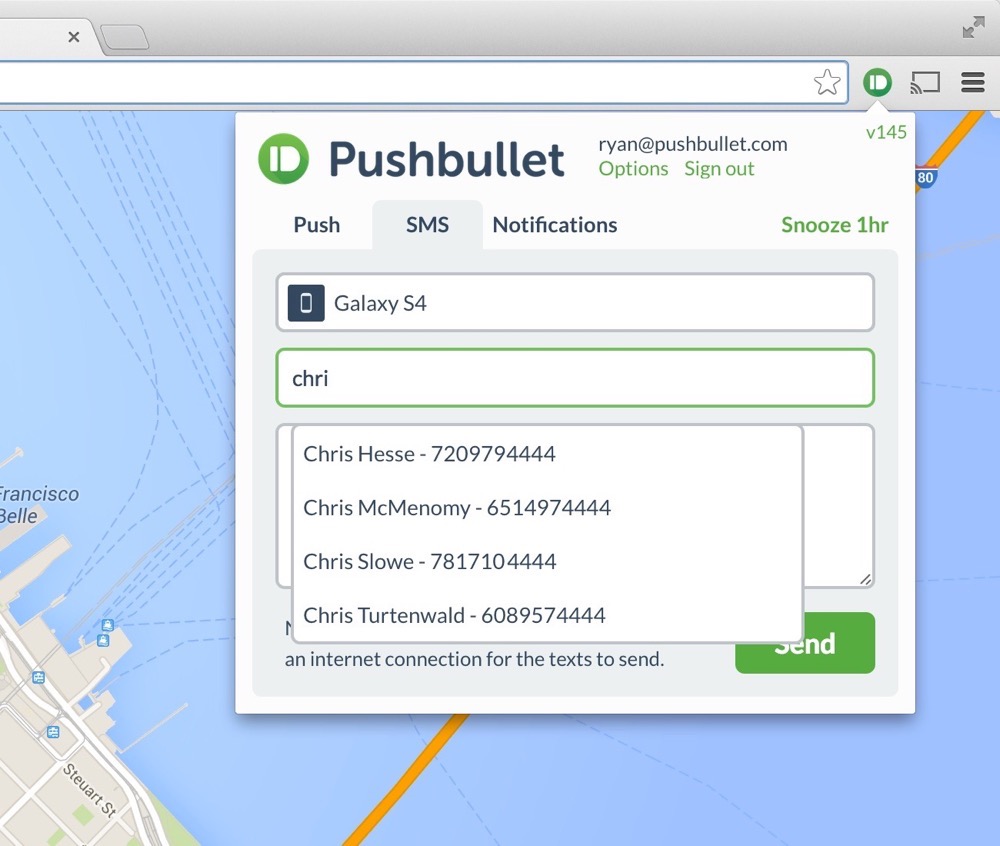
A couple of months back, Pushbullet received an update that allowed users to quickly reply to text messages from within their computer’s browser. Thanks to an update today, that functionality has expanded to allow users to initiate new text (SMS) messages through the Pushbullet browser extension.
In order to send new SMS messages through Pushbullet, make sure you have Pushbullet installed on your Android phone and in your browser of choice. If you already have it installed on your phone, be sure to grab today’s update.
Once you are installed and up-to-date, tap on the browser extension button for Pushbullet and you should now see an “SMS” tab. Tap on that, choose the device you want to send an SMS from, then type in a recipient (it may auto-complete as you type), and finally, type out your message. Once you click “send,” the message will be sent from your phone. It’s that easy, and awesome.
The newest update is live, so feel free to give it a try immediately.
Not sure if I should switch from Motorola Connect to this. Man…. idk. Suggestions?
I really wish PushBullet would release a Safari extension. And yes, I prefer to use Safari on my MB over Chrome.
What’s the difference between pushBullet and Endless Jabber? Really would like to know
Couldnt it do this awhile ago? I could’ve sworn I’ve been using this feature already.
You could reply to texts, but you were not able to initiate a text.
oh ok thanks for clearing that up
Can you send texts even when your phone doesn’t have a signal?
No, it still uses your phone to send the actual text.
PC>Phone (through internet)>Other Phone (through cell tower)
man if they did this for Hangouts, my life would be complete. my work blocks all chatting protocols so i’m forced to use my phone for chatting through Hangouts all day. some days its ok but some days its hard when i have long, multiple convos going at once throughout the day.
I can do that on my Moto X with Motorola Connect, and it works great!
Cool, but seems a little redundant with hangouts integrating texts.
Sort of. You can only send ‘texts’ via your PC from Hangouts through Google Voice, so only if you’re using your Google Voice number. You still can’t send normal texts messages through the Hangouts app or extension from the PC
Mighty text is awesome, but im excited to see this 😀
Lol GIF didn’t work out as planned?
http://i248.photobucket.com/albums/gg179/edward_lvr666/tumblr_lw4olq89RH1r39nb3.gif
+1 For MightText, been using that for a while.
I have been using mighty text for a while, and in my testing it’s the best at what it does, but if pushbullet continues in this direction, it very well could replace mighty text for me. I currently use both apps.
This is an awesome update but I still need history functionality like MightySMS.
PPLCONNECT lets you SMS, shows historic messages & syncs with inbox & you can call from the Mac, PC or tablet. It also shows your Whatsapp, Viber, Facebook & Instagram messages – basically all your other messaging/social media apps notifications as they come in.
Pushbullet blows motorola connect out of the water with this stuff, Connect hasn’t worked consistently properly for me in months
I agree
Connect worked great on launch, but now every update requires an hour of re-downloading every text before it’ll function at all, it freezes constantly, texts don’t go through, and if they do they won’t appear on my pc/phone until after someone replies.
aaaand no MMS >_>
Welcome to MightyText circa 2011, Pushbullet.
Sure. Just let me know when the almighty MightyText can do more than just that ‘Text’ …I’ll wait..
Pushbullet is SO MUCH MORE complete than MightyText there is just no comparison
1. Actually there IS a comparison here because we’re comparing the arrival of a feature that both programs now share.
2. I don’t need Pushbullet’s bells and whistles. Mightytext won’t ever do what Pushbullet does, so I won’t I won’t be letting you know anytime soon. Please don’t wait for me, you have much better things to do.
1. Actually there IS a comparison here because we’re comparing the arrival of a feature that both programs now share.
2. I don’t need Pushbullet’s bells and whistles. Mightytext won’t ever do what Pushbullet does, so I won’t I won’t be letting you know anytime soon. Please don’t wait for me, you have much better things to do.
Looks like MT can do a lot of what PushBullet does:
http://help.mightytext.net/knowledgebase/articles/358125-syncing-phone-app-notifications-to-your-computer
@Thanassi:disqus It’s funny, every few weeks DL writes another post about pushbullet – MightyText is such an unbelievable app and they never mention it.
I guess pushbullet really works for them, so they rep it really hard
Pushbullet is terrible for SMS. I want to see conversations, not a bunch of single lines. Mightytext is much better for that.
http://blog.mightytext.net/send-web-pages-etc-from-computer-to-phone/
http://help.mightytext.net/knowledgebase/articles/358125-syncing-phone-app-notifications-to-your-computer
PushBullet is one of my favorite apps and it is free! most used app on my phone after hangouts.
I’ll stick with Moto Connect for texts…everything else pushbullet does is sick though.
Moto connect didn’t treat me so well. Very slow/laggy.
Does it show up in your phone as a sent message?
Yes
For me it worked half the time previously. Just looked like the person I was talking with was just continuing to send text messages in the thread. Looked silly. I’ll give it a try again here…
Same here. Let me know how it goes.
Doesn’t show the sent messages unless backing out of the thread and going back in. So at least it captures them. Seems to be working alright.
The Hangout SMS thread does not update until you get out and go back into the thread. That’s the only way it works for me.
Same thing happens to me.
The exact the same happens if I send texts using MotoConnect. I have to back out of the thread before my texts sent through the browser show up on my phone.