The big Android Auto refresh that Google first showed off at last year’s Google I/O is starting to rollout! I know, I know, they told us to expect it last summer, but it apparently needed a bit more time.
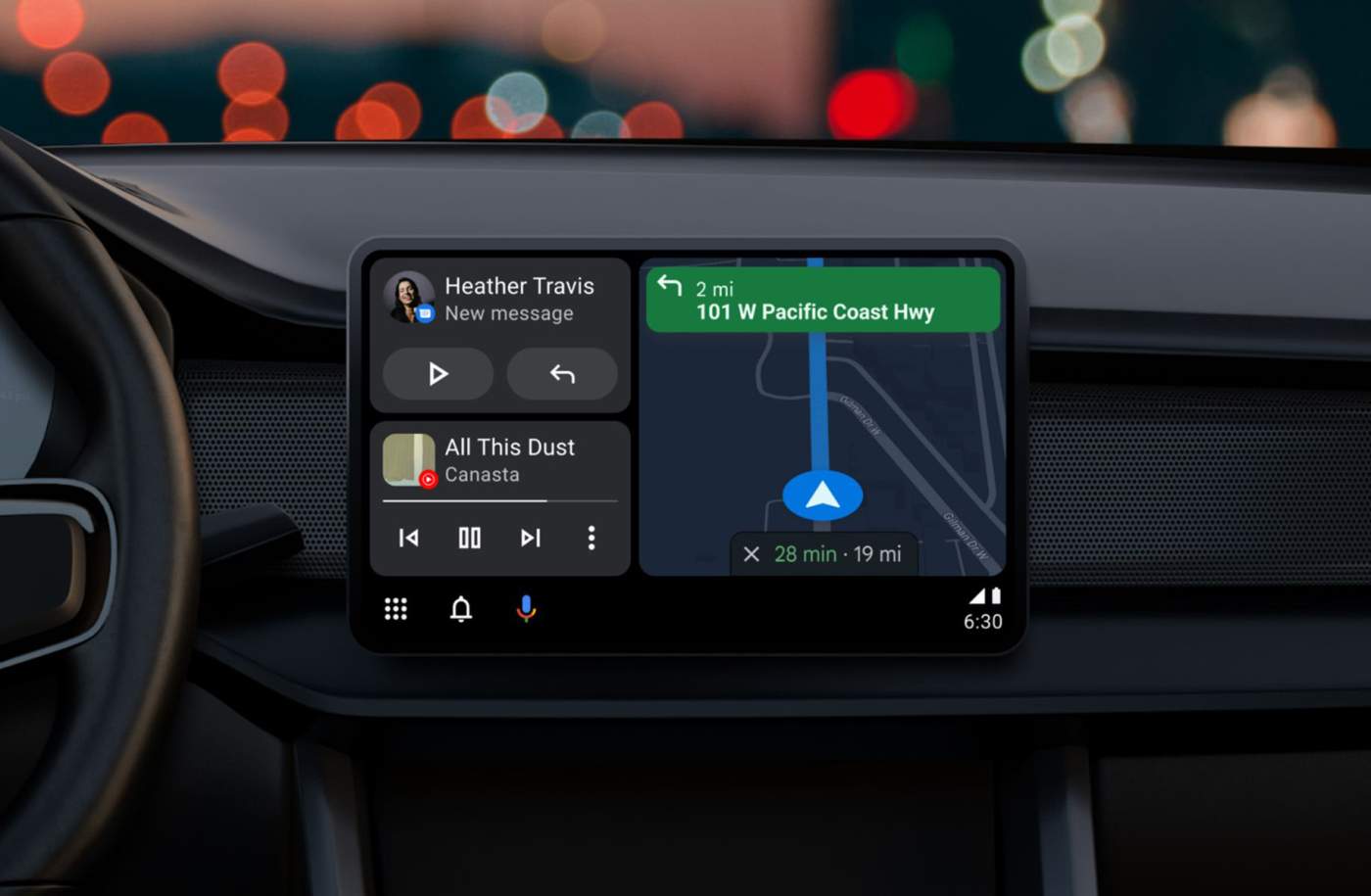
The new Android Auto UI arrives with a scalable experience to fit all sorts of screen sizes. It can feature a split screen mode that allows for more activities to display on the screen, plus Google Assistant is more available than ever, with contextual suggestions, alerts, easy sharing of things like arrival times, and single-tap suggestions when replying to a message.
The UI is kind of the star, though. The Google Maps panel should move closer to the driver, there’s Material You theming in album art, and a quick launcher lets you access recently used apps. If anything, it just looks slick.
In addition to the refreshed UI, WhatsApp calling is coming to Android Auto for those with Pixel and Samsung phones, plus Samsung and Xiaomi phones will soon get digital car key sharing (like Pixel phones got recently).
There are a lot of “soon” mentions there, and I wish I had more specifics for you. If anything, know that the new Android Auto is indeed rolling out, but some of those other features may not be here for a bit.
Showed up today. I like it so far.
Just received the switch over to the new split screen interface today. Drove home last night, old UI, started the car this morning and when Android Auto opened it was the split screen UI. Pixel 6 Pro / Mustang GT / Android Auto 8.7.630264-release / Motorola M1 wireless AA.
I own an Acura, and Android auto has 1 major issue that render it pretty much useless. There’s a battle as to whether or not it’s Googles problem or Acuras problem. i lean to acura b/c the same problem doesn’t exist in my friends GMC. Those are the only 2 built in AA experiences I’ve had. SO i’m asking you guys.
have you ever experienced any issues with AA like this: I press the steering wheel button to make a “call” command. it makes the call but the volume is so low you can’t hear them. they hear you, but you can’t hear them and even if you turn it all the way up, you can just barely hear them. So i disconnect the call, and now ALL volume is low. to fix, i have to disconnect the USB-C cable from the phone, turn off the car. turn the car back on. reconnect the cable. and it “resets”. but then it happens again every time i make a call.
i know there are work arounds. and they require retraining muscle memory. but i’m curious if this exists in any other cars or models. thanks.
Still #@#%?/! waiting for this on my 2022 Mach-E. ????
Nothing here on Pixel 7 Pro.
You sure this new UI is not for Android Auto that is built-into cars and not for the app where we connect our phone to the car?
Still nothing on my end.
I like it a ton but I use Waze more than Google maps. I got a pop up today saying its coming to Waze soon. Who know when that may be!
Not sure what they mean by Maps is now closer to the driver’s seat in the new UI. Whenever I used the old version Maps filled the entire screen.
It still can fill the whole screen SMH
Finally…now it will take another 2 months for them to switch it “on” from the server…
I’ve been using it for about 2 weeks now. Unlocked Samsung Galaxy S20+
Can’t wait for the day when our Pixel phones can double as our car FOB. I keep my car FOB on the keychain so eventually having the phone replace that will be awesome for unlock, remote start, pop trunk. Maybe they will incorporate the panic button into the Google Safety app as well.
I have this on my truck as PAAK (Phase As A Key). I don’t carry my keys with me ever. Its not a Google thing really.
Yes, this will be a great day when it comes. I also want quick settings toggles for things like remote start, etc. Google has already started the phone as a key, but it only works with BMW I think. They say more manufacturers are coming though.
Who, reading this, has gotten the update with the new UI?
I’ve had it for a few weeks now on my Camaro using my S22 Ultra. I like the new look, and it seems to be easier to use.
How did you get it? I tried to find a beta… no luck. And when google “rolls out” stuff I seem to always be a month after. Have pixel 7 Pro. Fold 4 as well.
Are you on the beta program?
And by the way, Droid life, “android auto is finally here” is false advertising. It’s not here…still… clearly, when most of us aren’t seeing it… so..it’s not here LoL
Yes, I am in the Android Auto Beta
I wonder if I’ll get my new car or this update first. Don’t have Android Auto in my old civic but my new hr-v will have wireless Android Auto and I can’t wait for it to arrive.
I’ve been using this in the beta for the past month or so. I like the UI. I just wish Android Auto allowed me to report incidents in Google Maps. Once I am able to do this I will be good.
I agree. It is wild that Google own Maps and Waze, but we can only report police speedtraps, accidents, construction in Waze only and not in Maps while navigating. But they do show up in Maps which is even more odd.
My thoughts exactly.
You can report incidents while navigating with Google maps on the phone, but if you project it to Android Auto, then there is no way to report incidents. As far as I know, Waze reports are not shared with Google maps users. The functionality is all there. I’ve been reporting this to Google maps for about 3 years now believe it or not. If more people keep mentioning it in feedback, maybe just maybe we’ll see it someday. But they literally only need to add the button and design a super simple projected Android Auto interface for the report types. All the backend stuff is already there and functional.
I will always upvote anyone who mentions incident reporting in the projected Android Auto interface is missing. Huge omission, it’s been missing for years. Everyone who reads this should take 1 minute and open Google maps to report feedback asking for incident reporting in the android auto interface.
I’ve been using it for a while now and it’s a nice refresh. I wish we could move the taskbar widgets to the side manually like in the pic. Mine are currently at the bottom. I’m pretty sure it’s dictated by the display in my Murano or I’m just missing something https://uploads.disquscdn.com/images/43c06a4cbfc3bca89f112a5aaff1b7420592f23940419d1f6952caffc53fcaa3.png
I want this too. I’ve been using this since day 1 of beta. No option to move it. It automatically switches by the display resolution it detects.
I believe if you go into the settings in Android Auto, towards the bottom it has a toggle for side/bottom nav
Just checked. Not seeing it there. Thanks though.
Nope. No option
I wish there was an option to NOT color-theme the album art, all it does it cast a color glow around the album art rather than being able to display the album art regularly with controls over it, as I’d prefer…otherwise the interface is pretty good when it works well and Android Auto doesn’t crash 😉
You already got the new interface ? Are you based in the US ?
People in the Android Auto Beta channel have been running the new interface for months.
I thought I was in the beta, just checked…, I’m not, I only had developper settings enabled. Thanks for your answer.
Not sure on how all this works. I have a Chevrolet Colorado 2021, how works the update process ? Do I have to wait for Chevrolet to do something about it (change a few things and release like Samsung does to Android) or simply authorize the update so we can have it or we are screwed and there’s no updates, only future cars will get it ?
Maybe we (the users) have to do something about it ? Do you have to actually approve something, go in the settings or something ?
I would love to have it, but not sure how this all works ?
Thanks !
It’s software ran by the phone. Chevy will have nothing to do about it. You just have to be on the most recent Android Auto version on your phone, and then Google will eventually give you the new interface. This far, it’s been a server side change as it’s already built into the code of the apk. Has been since NOV.
Ok, that’s great news. Thanks for your input on this. I’m glad it’s not a kind of custom Android Auto that the dealer has authority over it, that’s mainly why I use Pixel phones, I hate it when there are new features and that I have to wait for a 3rd party company to input his code over the main system code, so it could work, I like when it’s vanilla, there’s much less hassle when it comes out.
NEED MORE DETAILS. HOW DO I FINALLY GET THIS
YOU WAIT!
Google will enable it server-side when they feel like it.
Then Why write a story saying “Its finally here” when its not
I’ll be excited to see it! My hope is the make the call screen better; a huge problem I have is when the call is over, if the other person doesn’t hang up, when you press the end call button on screen, it’s to laggy it often calls the favorite contact in that same location on the next screen! I’ve done that a hundred times by accident.
That’s a feature! They want you to call your mother. She misses you.