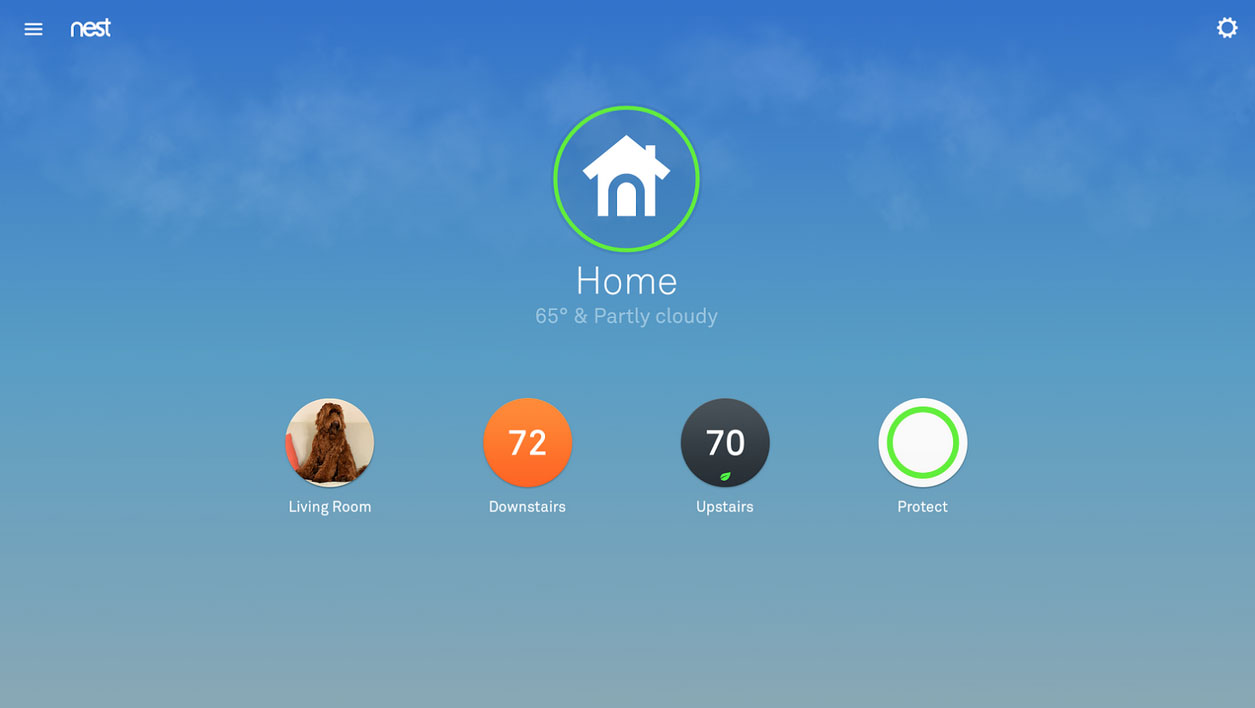
During today’s Nest event, Tony and the boys announced that a new Nest 5.0 app would arrive on both Android and iOS. If you are at all a Nest fiend like me, then you have been checking constantly since the event wrapped for an update to the app. As it turns out, all of that checking for an update was a waste of time, because you actually have to install a brand new Nest app. Let me say that again – the old Nest app can be uninstalled and you will need to install the new Nest app. I know, this isn’t typically how big updates go, but that’s what we’re working with here.
The new Nest app is now just called “Nest” instead of “Nest app” like the original. The new icon for it also has a bit more gradient and shadow, for those paying attention.
As a recap, the new Nest 5.0 app is a big deal. Not only does it feature a brand new UI and support for the Thermostats and Protects, but it brings in your Dropcams as well (the new Nest Cam too). So now, all of your Nest products live under a single app.
Here is the list of new features:
- Home Screen – Each Nest Thermostat, Nest Cam or Dropcam has its own spot, while all your Nest Protects roll up into one icon. You can also see live video previews of all your Nest Cams on the home screen so you can get a quick glance of different rooms.
- Nest Learning Thermostat – It’s now easier to get to and use popular thermostat functions like Energy History, Heat/Cool mode and schedule.
- Nest Protect – Provides access to Safety Checkup, which lets you test all your alarms from the app, and App Silence lets you hush false alarms from your phone.
- Nest Cam and Dropcam
- Nest app offers new enhanced features for phones, including zoom and enhance, which adjusts to give you a sharper view.
- Talk and Listen is now easier to use. Just hold down the icon and start talking, just like a walkie-talkie.
- If you have a subscription to Nest Aware with Video History: The Nest app provides a summary of captured events, making it easy to spot moments in your Video History when your camera sensed motion or sound. You can easily skip among events or jump 30 seconds at a time.
- Dropcam Pro and Dropcam HD can now be accessed from within the Nest app.
- If you have a Nest Cam and Nest Protect in the same room, you’ll see a camera button when you get a smoke or CO alert on your phone. Tap the button and you’ll immediately be taken to a live view of your home, so you can see what’s going on. Nest Cam will also record a clip of what happened, even if you don’t subscribe to Nest Aware with Video History.
Again, this is a brand new app that requires a full install. The old Nest app, well, feel free to get rid of it.

I like the new app, not sure why everything these days has to go by Material Design guidelines. Still wish the camera’s weren’t so expensive, they must be making a huge profit margin off of these things.
Because it’s a beautiful experience when everything is consistent and you don’t have to wonder what you gotta do just to use it (like swiping from top instead of left).
Google even showed statistical data where “Materialized” apps got ~40% more activity/downloads than before
Love the new app. They will add all the dropcam features in future updates (they’re keeping the Dropcam app around for a while until they do). I think it’s a beautiful new app
I have 2 dropcams and a Nest thermostat. I love how they are integrated now
< How about stop doing fad things and actually do something that works like sensible eating
and natural movement that encourages optimal body function. I have been using a system that
helps strengthen core and pelvic floor muscles, realign body for optimal function through
intensive interval workouts and core workouts. Get this absolutely FREE http://Watch Here/8…
➧♪❖►✈☃☛❖✔✔✔☃☛❖✌✔✔✔☃☛
i like me droid…….
……………….. Find Get More </b
jghj
If you want Success. Read this life ‘s article… google Online Job Help
Can’t believe this is a serious big-time update from a company that was bought by Google. The new app is a completely separate installation for some reason, feels like some foreign iOS port, and lacks material design. Pretty big letdown.
“””” if you, roid-life`s posting is really great.. last wednesday I bought a great new audi after earning $6949 this month and just a little over 10k last munth . it’s definitly the coolest work Ive ever had . I actually started 5 months ago and pretty much immediately began to bring in more than $83 per-hour . read the full info here >>
??< Keep Reading
The iOS app was just an update, no new app for me. It is slow to start though.
Agreed.
The app design is atrocious. Being a Google company you’d think they would at least TRY to follow Material Design guidelines. Instead it looks as if they purposefully went their own way just to show Google that they can do whatever they want.
At the moment it’s the most inconsistent app on my phone. Kinda puzzles me why Google can’t demand consistency from their own branch.
Not getting a lot of positive reviews… removed some features.
Kellex, thanks for all of the great reporting on the Nest news today. I’m a big fan of their products.
So under settings for cameras the highest resolution for my 1080p pro HD is 720. Awesome!
Where did you get a Dropcam Pro with 1080p?
They all are 1080p that’s why it’s the pro model. Dropcam/nest lowered the resolution to 720 to “give customers a better experience ” something like that. The hardware is capable of 1080. I hope they didn’t do this just to make the nest camera have a better feature. Calling them now about it actually.
let me know your findings. this was the first thing i noticed, and it annoyed the hell out of me
Also under camera settings nest aware it shows no subscription for any of my cameras. I wonder if the dropcam subscription doesn’t transfer over until it renews. Also can’t find a way to stream high quality when not on wifi.
Disapointed. How does Nest do away with location based alerts in the new app?! The below features have been removed. You may want to hang onto the old dropcam app if these are important to you.
Location aware camera on/off: Turn your camera on or off depending on where you and your phone are.
Location aware alerts: Turn alerts off when you’re home, and on when you’re away.
It was a bit of a pain trying to find the new app….
The iOS app update wasn’t a new install, it just updated the same app
What a great way to release an upgrade…
Some cool new features but it seems like the UI has gone back a few steps. Feels too much like an iOS port and I miss the transparent status/nav bars.
Huh? The last app was a direct ios port. 5.0 is more polished