

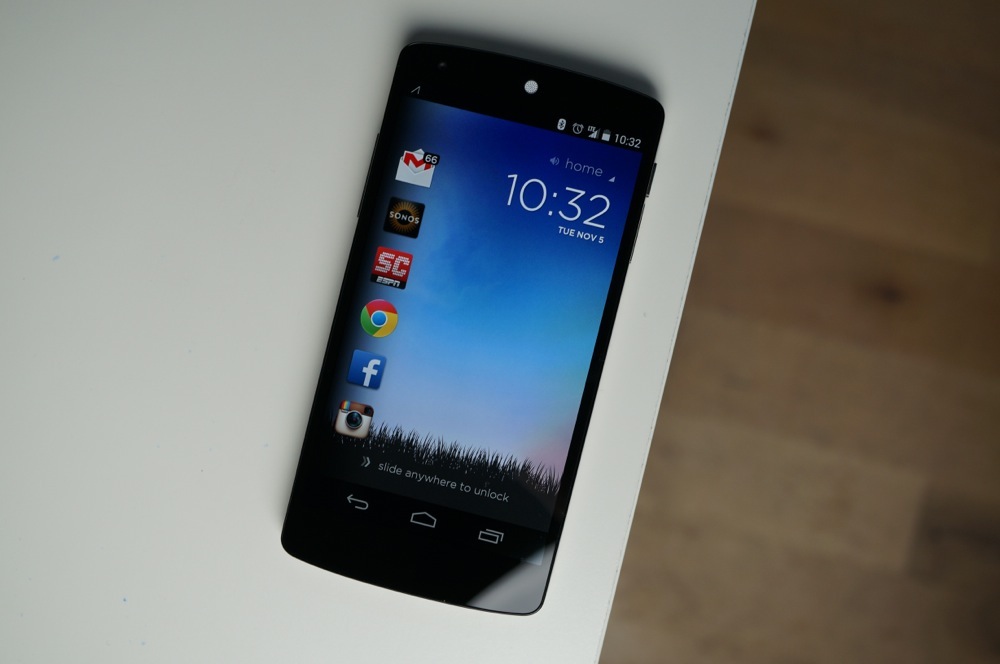
Cover for Android, the contextually aware lock screen replacement we featured a few weeks back, has now entered closed beta through Google+. We were a part of the first wave and have given it the proper first look to show you what an ever-changing lock screen with a buttery smooth UI looks like. So far, I’m liking what I’m seeing, but it’s one of those apps that will certainly get better over time.
When you first boot up Cover after installing, you’ll be taken through a tutorial on how the app works. It’s all pretty straight forward stuff, just be aware that it’s going to ask for your home and work address. You could lie and leave those with fake addresses, but it’ll be much more accurate with its changes should you input correct locations. From there, Cover will start loading up locations and apps that it thinks you’ll use often.
There are locations for Home, Work, Car, and Out, all of which are either location or movement-based. The Home location is also time based, meaning you have a location for day time activities and another for night, when you are presumably relaxing on the couch. You can change the wallpapers of each and a few select settings, one of which is a silent mode for when you are sleeping (like Samsung’s Blocking Mode).
To interact with Cover, all you need to do is grab an icon and drag it to the right. You can either fully swipe it to open into that specific app or “peek” at its contents (for calendar meetings, files, emails, etc.) without having to fully unlock your phone. You can swipe up on the screen to see more apps or swipe to the right to fully unlock your phone to its home screen. It’s simple once you understand the directions you need to swipe, but it could become very powerful once it learns from you.
To see it in action, check out the video below.
[youtube]http://www.youtube.com/watch?v=0WkVXD5TqQg[/youtube]
Cover Links: Sign-up | Google+ Community | Play Link
Cover is now on the play store
I have had cover for about2 months or so now it’s a good lockscreen best I’ve tried yet=)
“Or stock launcher if you’re using a Nexus 5” I haven’t touched a third-party launcher since my OG Droid days. 😉 I love the way stock android looks on my Galaxy Nexus.
Download here: androidfilehost.com/?fid=23212708291674401
Download here: http://www.androidfilehost.com/?fid=23212708291674401
I signed up for the beta and was sent my invite today. So far its exactly what i’ve been looking for in a lock screen replacement. Free good looking, easy to use and smooth.
could someone get me an invite please??
Will trade for Aviate, if that is even relevant anymore…
Just found that if you swipe down on the status on the right side it brings up an app launcher. It only works once you unlock the phone.
It’s very safe to assume you like the Nexus 5 from all the times you say how fast it is =)
Cover + Aviate = Awesome
Great job, so far, Cover. Smooth, no excessive battery drain on my S4 and it seems to be learning very quickly.
Cover + Aviate = Need 6500mAh battery 🙂
Not on my S4, pal. Only 5% battery usage since I loaded Cover this morning and have been running it all day.
Tried their beta on my GS4 and it ate battery like crazy. It’s a great idea, they just need to figure out the battery drain issue.
So….anyone have an apk :3
I signed up like 2 weeks ago and no email :'(
Is that a Google Glass icon in the left corner???
Was wondering the same thing.
Holy Battery Eater, Batman.
Mine hasn’t been too bad so far. After about a week of use the app has been 2-3% of total usage by the end of the day, along with a healthy uptick in google services % for location services (I assume). I haven’t had problems getting to nighttime with battery left. I was also trying Aviate and saw a much bigger drain on my battery from that.
i like aviate
Got an Invitation last night and so far, I’m really enjoying it. with just a half days use, it’s already nailing what apps I’d be wanting.
It’s having a few issues with location awareness it seems, but overall I’m really digging it!
have you noticed a battery drain more than usual? My battery level is dropping pretty bad since I installed it.
Actually, yes I have noticed. That’s the main reason I disabled it today.
Signed up a few weeks ago, and receive a invite to use it this morning. I like it just a few bugs like Aviate but it’s good so far, about to uninstall it though its been draining my battery pretty good for some reason, and ran into some issues with scrolling to get to apps.
How did someone who signed up after me get it first? >.>
Where can get the wallpaper, anyone?
I signed up about 1 month ago, sort of. I haven’t received any invitation yet.
I hope Cover is more battery-friendly than Aviate Launcher. Aviate eats battery like a fat kid eats cake.
In the words of peter griffin. hehehehehehehe.
I have a Droid Maxx and a GNEX both with Aviate on them and have not noticed any battery drain issues.
Honest question, bear with me:
So android is app based, meaning most functions are based on individual apps (ie- launcher, dialer, messaging, etc are all separate apks). So is the lockscreen an apk? I would believe so because there are app screen replacements on the Play Store. Correct me if i am wrong there. But could there be a lockscreen apk from 4.4 to sideload? I’m assuming there is much more to it* like it being tied tightly to the system. Just wondering why there aren’t just stock lockscreen apps in the Play store that are actually reliable. (holo locker is not very updated, so dont suggest that. And WidgetLocker has too many things i don’t even need)
*edit: i KNOW there is much more to it. I would just like some explaining 🙂
Good question, as i’d love the 4.4 lockscreen
My guess is that it is tied more into the settings and security side of Android is its not able to be sideloaded by other phones/versions. That’s just my speculation though. I don’t really know. But i would love it as well!
Does it support Badge Notifications (little #’s on the App icons themselves)? That’s a must-have for me & the reason I use WidgetLocker combined with MissedIt.
There are badges on the apps. Like unread count on Gmail, Hangouts, etc.
I have aviae and love it! Can’t wait until I get my invitation to this!
I kept hearing the words Kellen was saying, but my mind was translating it as “That Nexus 5 though.” “Lightning fast on that Nexus 5 though.”
Can someone summarize what this video was about? lol
*looks around in fear of snapple*
Speaking of snapple, iOS will no doubt offer a similar feature next year and deem it “revolutionary”.
everything home for a similar type launcher
play link not working?
This might make more sense just as a launcher instead of a lock screen override. I’ve always felt the point of the lock screen was to either lock your phone from other people or from errant finger swipes.
Check out Aviate for a contextual launcher.
You should try it first, it’s nice.
Cover + Aviate = Organic Android Device
or cover+everything.home
It was like two weeks ago I signed up, was there some sort of plan of release on this app?
My Uncle Caleb got an almost new green Lexus only from working off a computer… right here…
www.day37.com
Your Uncle Caleb is a jerk.
I don’t have the slightest clue of what he said.
My Uncle Carter recently got an awesome red Hyundai Santa Fe SUV
just by parttime work from a macbook air… http://www.bay35.ℂℴm
I’m impressed at how quickly the apps open up right from Cover. I’m liking it so far except Active Notifications for my X are pointless with this because no matter what, it always unlocks to cover first.
that’s a bummer…..not giving up my active notifications for anyone
the ‘play link’ is bad
No, it’s not. You can’t see it because devs use the relatively new Play Store’s system to share the apk only with beta testers.
I’ve been using this for a few days now. I agree it is nice and smooth, a few major issues for me are deal-breakers for now though. I will definitely continue to keep an eye on it.
what are the major issues?
A few.
One, there is not an option to turn off ringer rules. I originally had set rules for silence at work, but when it suddenly switches to road and my phone rings during a meeting, no bueno.
Second, I have a Moto X and if I unlock the phone from the active display I have to unlock it again from Cover. It should skip Cover if I unlock from active display.
Another small one is that the wallpaper for Cover doesn’t go behind my home navigation keys. So my regular wallpaper can be seen there and it just looks funky and ruins the design aesthetic.