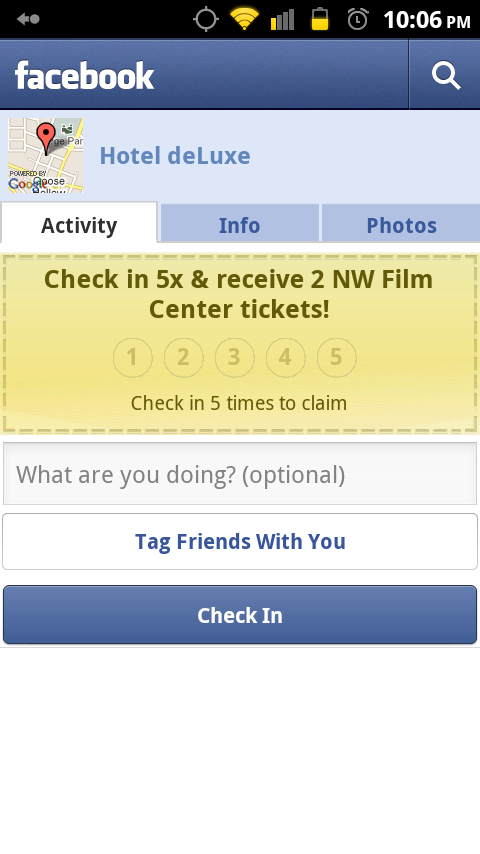
An update for the Android Facebook app hit late last night and for some reason seems to be confusing everyone. The update included “Deals” which is really just an addition to the “Places” tab that we were introduced to a couple of months back. In order to see what deals are near you, you open up the Places tab, tap on “Check In” and start browsing locations in your area. As you cruise through listings, ifyou notice a little yellow notepad looking icon then that means there is a deal there.
Download it now from the market.


Pingback: nimble social crm
Pingback: implant dentist palm beach
Pingback: greenworks 26032 review
Pingback: Soap art
Pingback: worx wg650 reviews
Pingback: emergency dentist
Pingback: Healthy LifeStyle, Food and Fat Loss in Reviews
Pingback: CIB K404AV500G
Pingback: B-O-X Gold
Pingback: silhouette cameo reviews
Pingback: TRX Force Kit
Pingback: african safaris
Pingback: dyson dc41 animal review
Pingback: cannon security products ddv-s-01 lcd peephole door viewer
Pingback: bosch clpk232-181 amazon
Pingback: tredent.com
Pingback: bob revolution se single stroller reviews
Pingback: home inspections la
Pingback: x-treme scooters xb-600
Pingback: India Tour Packages
Pingback: rug
Pingback: Fruit Bouquet
Pingback: cellphones accessories
Pingback: Whatisserotonin
Pingback: cheapest hearing aids
Pingback: motu 4pre price
Pingback: Wordpress Blog Host