


A potentially underrated new feature included in this month’s November Pixel Drop is the introduction of a dedicated Family Hub space directly in your phone’s settings.
Google has had a web version of this Family Hub for some time through your Google Account settings, but with this month’s big Android 17 QPR2 update and Pixel Drop, they are moving this section into your main Settings page on Pixel phones. Now, once updated, you’ll find your account section at the top and this new Family section underneath it.
This brings all of your Family Hub settings to a much more accessible area, letting you control who is in your family and all of the other settings. As you can see from the screenshots taken on my Pixel 11 Pro, this area is a lot like what you’ll find on an iPhone within its Family section.
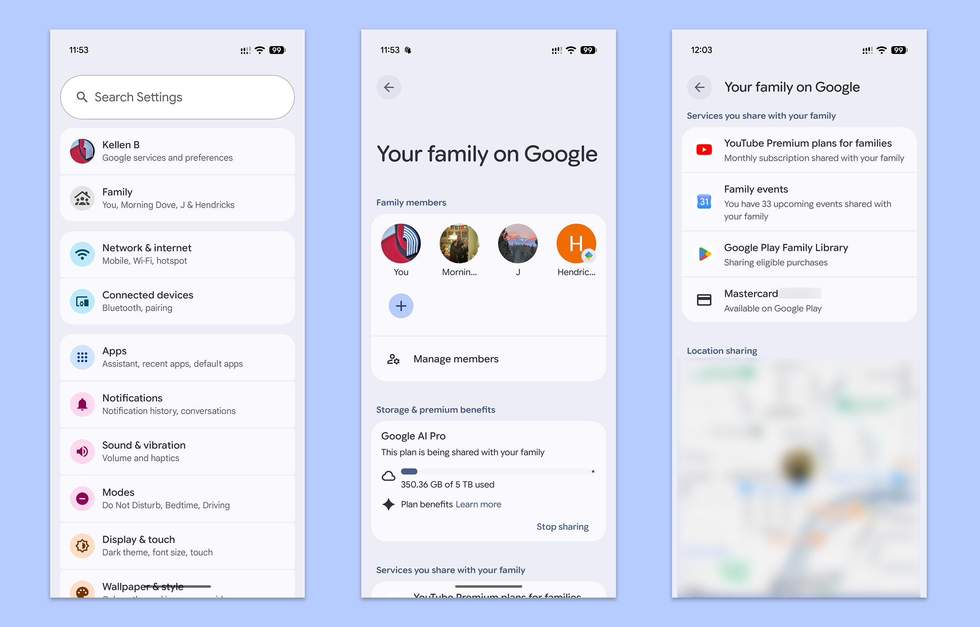
Things like your Google One subscription (we have Google AI Pro) and the amount of storage your family is using can be seen, as well as a shortcut to your other plan benefits. If you scroll further, you’ll find other services that you share with your family, like YouTube Premium, calendars, Google Play libraries, and the card that everyone has access to.
You can also track the location of people in your family if they are sharing location. A little dropdown menu will let you pick each member and then request location access if they aren’t already sharing.
This is a super handy addition to Pixel phones. This information used to take some effort to find, but now it’s just a Settings icon tap away.
If you aren’t seeing the new Family section yet, try updating your Google Play Services as this was included in the November 2 update of that.