Switfkey 3 Beta Updated, Some Bugs Fixed and UI Gets Enhanced (Updated)

by: | posted 05.05.12 | Apps, News

Update: We didn’t realize that SwiftKey Tweeted this new beta out to the public the other day. It doesn’t look like this is a private VIP thing any longer. Download it here.

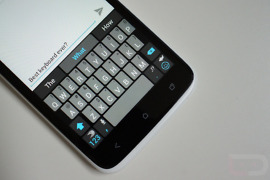
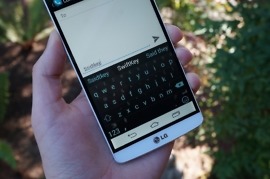
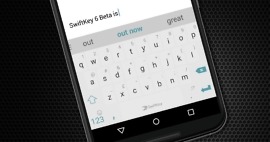
A new version of the Swiftkey 3 Beta has been pushed out to VIP users today. In the newest build, there are lots of bug fixes, improved UI, and some various other additions for all you testers. There was one in particular that made Kellex and myself completely stop using the Beta, which was the “What’s New dialog popping up all the time” bug. Totally annoying. Here’s the full changelog:

Since the last version we have:

  • Improved the UI: there is now a dedicated comma key, and the <123> key is now in the bottom-left corner. And of course you still have the larger spacebar.
  • Refined the Smart Punctuation pop-up.
  • Reintroduced the Long-press duration setting.
  • Improved Smart Space functionality.
  • Further reduced lag on some devices.
  • Fixed a number of bugs, including the missing decimal point in the numpad and the “What’s New” dialog popping up all the time.

Have any of you given it a go yet? It’s pretty solid so far.

Cheers AJ!

Swiftkey Beta 3 Released – Introduces Blindtype-esque Engine, New Themes, Smarter Everything

by: | posted 04.04.12 | Apps, News, Videos

It has long been documented that Swiftkey is the top keyboard amongst users here at Droid Life. When it comes to predictive texting, nothing comes even close to it. Today, Swiftkey released beta 3 of their increasingly popular keyboard, taking their lead in the non-swiping space and extending it. In this latest update, you will find what they are calling “Smart Space,” which is sort of like the ICS keyboard’s Blindtype. You can type and type and type and it will figure out the sentence you were attempting even if you failed to put spaces in between words. They also tossed in two new gorgeous themes, quicker symbol selecting, backups of dictionaries, and more. 

Swiftkey X Alpha Introduces Multi-Touch, Can I Get a “Finally!”

by: | posted 11.04.11 | Apps, News

I woke up this morning to a surprisingly lovely email from Swiftkey about a new feature that they are testing in an alpha version of their X keyboard. Multi-touch anyone? As someone that hammers away on his on-screen keyboard at a rapid rate, being able to touch the screen with both fingers at the same time and still produce results is beyond needed. And as one of my favorite keyboards of all time because it always seems a step ahead my sometimes slow moving Pacific coast time brain, this new feature is going to be incredibly huge once they get all of the bugs worked out.

Over the next few days, we would greatly appreciate your participation in Alpha testing our latest update to multi-touch functionality. This version is an Alpha, so we would advise against using it as your primary SwiftKey keyboard. However, your feedback will assist us in refining the SwiftKey experience for the betterment of all of our users. We’d appreciate if you could take some time to give this Alpha a thorough test.

We have made improvements for rapid typists. We now properly support multi-touch so you shouldn’t get accidentally repeated letters or accidentally missed letters when typing at speed with more than one finger. If you could try this out and in particular look out for issues with long-press keys, alternative character selection or keys where the highlighting gets stuck. We are particularly interested in results from tablet users touch typing as well as phone users with two thumbs. When reporting if you could be as descriptive as possible about exactly what you do to create the problem otherwise it will be very hard for us to fix it.

So this “alpha” is only for members of their VIP program which means that not everyone will get to test it. If you are a part of Swiftkey’s testing program though, you will want to check your email or at least jump into their forums to get the file. It will be up for two weeks – go get your testing on.

Via: Swiftkey

Swiftkey X Receives Pumpkin Theme for this Weekend, New Keyboard Layouts, and Bug Fixes

by: | posted 10.28.11 | Apps, News

Our fine friends at Swiftkey notified us yesterday that their Swiftkey X keyboard had an update available in the market. Included was this Pumpkin-inspired look to make your Halloween adventures this weekend that much more complete. They also threw in some bug fixes and new keyboard layouts. A fine update to one of the best Android keyboards you will ever use.

Market Link

Adobe Flash 11, Foursquare, Evernote, Tumblr, Google Reader, and Swiftkey X All Receive Updates

by: | posted 10.14.11 | Apps, News

Not sure what the deal is, but I had like 12 apps asking to be updated this afternoon. Flash Player 11 received some security fixes, Tumblr fixed bugs and added new post screens, Foursquare changed icons, Swiftkey X improved, and Evernote made it easier to go “Premium.” Nothing major from most of these, but you may want to cruise into your market if you haven’t been notified yet and see if anything has a new version. I guess Friday is now a prime time to update your apps before the weekend.

Cheers Mike!

New Swiftkey Beta for Phones and Tablets, Better Predictions and More Typing Stat

by: | posted 09.22.11 | Apps, News


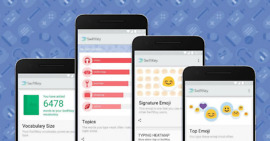
The tablet and phone versions of Swiftkey beta received sizable updates today, bringing them to version 2.1.0.207.  If you are a part of the program, then as always, we suggest you jump on over to the forums and pick up these newest builds. The Swiftkey team has added an autocaps toggle, more personalizations, easier language switching, more stats about how you type, and this really cool heatmap of your keyboard use.

There were also bug fixes and some improvements made, but this is the list of the new toys:

  • Autocaps toggle – now choose whether your sentences begin with a capital letter or not
  • Better personalization – SwiftKey can now learn your typing style from your blog
  • Language switching – easy transitions between (e.g.) English and Russian keyboards, just slide the spacebar
  • More stats about how you type with SwiftKey – and more links to share them
  • My typing heatmap – cool visualization shows how you use your keyboard

Swiftkey:  Phone | Tablet

Thursday Poll: Favorite Android Keyboard is?

by: | posted 09.22.11 | Polls


There are so many keyboards these days that it has almost become a chore to keep up with them.  I seem to find myself switching on a weekly basis, falling in love for a couple of days with one, and then reverting back to or finding a new option shortly after.  My current active keyboard of choice is GO Keyboard, but that doesn’t mean I don’t have the itch to jump back to FlexT9 or Swiftkey X.  A lot of these keyboards are just so good in their own right, however, I can never decide which is my go to.  What about you?  Favorite keyboard right now is…?  Or better yet, which keyboard can you not live without?

Favorite Android Keyboard is?

View Results

Loading ... Loading ...

Swiftkey Wants You to Type Like a Pirate with PirateKey X

by: | posted 09.16.11 | Apps, News


Monday is international Talk Like a Pirate Day, and Swiftkey wants to help facilitate that by giving you a special edition Pirate-talking keyboard.  It works just like their normal predictive text staple, but it suggests pirate lingo along the way.  As you can see from the screenies above, they held nothing back and even themed the app to be pirate-esque.  It’s silly sure, but fun.

Oh, they also launched a new VIP forum and are thinking about doing other fun keyboards like this in the future.

If you are a Swiftkey member, you can grab the file from this thread.